
SolTradingBot is a Telegram-native bot built exclusively for Solana traders. It covers sniping, copy trading, DCA, limit orders, and wallet management, all without leaving your chat window. This review covers every feature, the fee structure, how it compares to Trojan, and who should actually use it in 2026.
Key Takeaways
- 4 dedicated sniper modes: Pump.fun, Moonshot, LaunchLab, and BAGS.
- 1% trading fee; 0% on BONK, MYRO, WIF, JUP, and WEN.
- 20% cashback on every trade, applied automatically.
- Solana only. No multi-chain support.
What Is SolTradingBot?
Launched in 2023, the bot has processed over $5.2B in volume across 1.2M users (team-claimed) with a deep, Solana-specific toolset covering every stage of a trade. It’s non-custodial — keys stay AES-encrypted in the bot, anti-MEV protection runs via Jito, and a Chrome Extension is available for desktop traders.
Is SolTradingBot Legit?
The bot has a documented feature set, official documentation on GitBook, and an active $STBOT token listed on Raydium, Bitget, MEXC, and Phemex. Volume and user counts come from the team rather than on-chain analytics, so treat those figures as directional. Everything else, including the sniper modes, copy trading, and cashback system, is verifiable by simply using the product.
Features

- 🎯 4 Sniper Modes: BAGS, Pump.fun, Moonshot, and LaunchLab, each targeting a different launch type on Solana.
- 👥 Copy Trading: Mirror any wallet, including top-100 whale wallets, in real time with no complex setup.
- 📈 DCA: Auto-buy on a time schedule or after a price dip, good for tokens you want to accumulate over days.
- 📉 Limit Orders: Set a target price and let the bot execute. Includes Take Profit, Stop Loss, and Trailing Stop presets.
- 📊 Token Explorer: Full DEX volume data, filters, trending pairs from DexScreener, price alerts, and buy/sell wall tracking.
- 👛 Multi-Wallet Support: Create or import multiple Solana wallets with instant SOL transfers between them.
- ⚙️ Custom Dashboard: Choose which wallet stats and trading data are visible.
- 🛡️ Backup Bots: Secondary instances activate automatically during network congestion.
- 💸 Cashback System: 20% of trading fees returned automatically. Pump.fun cashback claimable via
/pumpfuncashback. - 🪙 Claim Your SOL: Reclaim SOL from accumulated trading fees using
/claimyoursolinside the bot. - 🔌 DEX Integrations: Raydium, Jupiter, Pump.fun, PumpSwap, Orca, Moonshot, boop.fun, Meteora, and more.
Sniping Modes
SolTradingBot offers 4 dedicated sniper modes, each suited to a different launch type:
- 🎯 BAGS Sniper: Targets early-stage tokens before they gain traction. Best for degen-style early entries.
- 🚀 Pump.fun Sniper: Fast entry on Pump.fun meme launches, paired with the
/pumpfuncashbackcommand to recover fees. - 🌙 Moonshot Sniper: Focused on ultra-low-cap tokens with breakout potential.
- 🔧 LaunchLab Sniper: Targets Raydium LaunchLab token launches directly.
You set gas priority, slippage tolerance, and buy amount before triggering any snipe. The bot also detects when a boop.fun token upgrades to Raydium and can pre-ready a snipe automatically, so you do not miss the migration window.
Trading and Automation
Sniping is only part of the picture. SolTradingBot works equally well as a day-to-day trading tool. You can buy and sell any Solana token at market, or set limit orders to avoid chasing green candles on low-volume pairs.
Copy trading is one of the more practical features. Pick a wallet, the bot mirrors it. There is no complex setup or filtering interface to configure. If you want to track a known whale from the top 100, you can be copying their trades within a minute. DCA is useful for longer plays: set it to buy every few hours, or trigger a buy after a specific price drop. Combined with the Trailing Stop preset, it creates a reasonably complete position management system without needing a separate terminal.
The built-in token explorer covers the basics without a second tab open. You get DexScreener trending pairs, volume filters, liquidity thresholds, real-time price feeds, and chart views with buy/sell wall tracking.
Wallets and Security
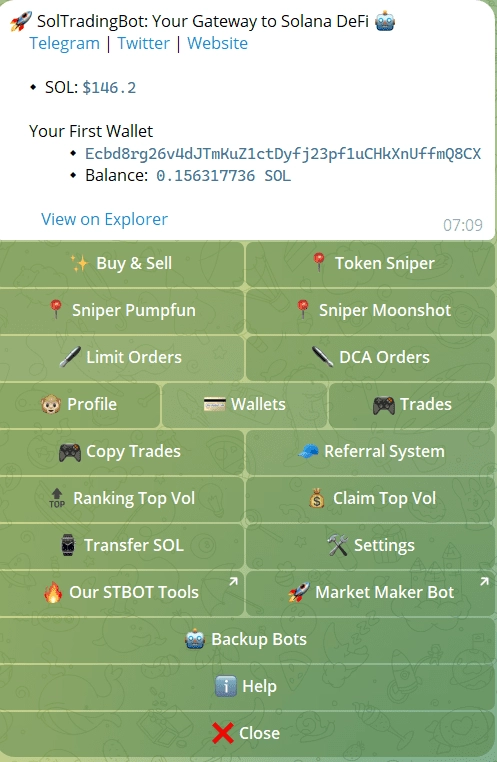
Everything wallet-related runs inside the bot. You can generate a new Solana wallet, import an existing one, or manage several at once for different strategies. Instant SOL transfers between wallets require no third-party tool.
Security layers include 2FA, MFA, AES encryption, anti-phishing measures, and session timeout locks. During heavy network congestion, backup bot instances activate automatically. If the main process stalls during a high-traffic launch, a secondary instance keeps your trades live. This directly addresses one of the most common Solana-specific complaints about trading bots.
Fees and Cashback
SolTradingBot charges 1% per executed trade, dropping to 0.9% with a referral code. There is no subscription and no locked features.
5 tokens trade at 0% fee: BONK MYRO WIF JUP WEN. If you trade any of those regularly, the bot is effectively free to use.
The cashback system returns approximately 20% of fees automatically. For Pump.fun trades, use /pumpfuncashback to claim that layer separately. The /claimyoursol command lets you reclaim SOL from accumulated trading fees based on your volume. Both are accessed directly inside the bot.
How to Use SolTradingBot
Open SolTradingBot on Telegram
Create or Import Your Wallet
Type /start and follow the prompts. Generate a new Solana wallet inside the bot, or import an existing one using your private key. Enable 2FA before funding.
Fund Your Wallet
Send SOL to your bot wallet address. For sniping, 0.1 SOL is enough to test. For real launches with fast gas, 1 to 3 SOL gives you better control over priority fees.
Choose Your Sniper Mode
Select a mode from the menu: BAGS, Pump.fun, Moonshot, or LaunchLab. Set your gas priority tier, slippage, and buy amount. Each mode has its own preset panel.
Set Up Copy Trading or DCA (Optional)
To copy a wallet, paste the address into the copy trade panel. To set up DCA, choose an interval or a price dip threshold. Both run automatically once configured.
Claim Your Cashback
After trading, use /pumpfuncashback to claim Pump.fun fee cashback and /claimyoursol to recover SOL from your trading fee volume.
SolTradingBot vs Trojan on Solana
Both bots are Solana-only and cover the core feature set: sniping, copy trading, DCA, and limit orders. The differences come down to speed, depth, and ecosystem reach.
Trojan runs on proprietary BOLT technology with sub-2-second execution and a full web terminal at trojan.com/terminal. Its Arena loyalty system offers up to 45% cashback at the highest tier, and it leads on lifetime volume at $25B+. For pure execution speed and web terminal depth, Trojan has an edge.
SolTradingBot counters with 4 named sniper modes, broader launchpad coverage including boop.fun auto-detection, and a simpler onboarding path. The flat 20% cashback requires no tier progression. The Sell Sniper for Pump.fun-to-Raydium migration exits is also a standout feature not found on Trojan.
| Bot | Chains | Features | Fee | Start |
|---|---|---|---|---|
 |
Solana |
4 Sniper Modes
Copy Trade
DCA
Backup Bots |
1% / 0% partners | Start |
 |
Solana |
Auto Sniper
Copy Trade
DCA
Arena Cashback |
1% | Start |
Pros and Cons of SolTradingBot
Pros & Cons
- 4 dedicated sniper modes for different launch types
- 0% fee on 5 major tokens including BONK and WIF
- Copy trading and DCA in the same Telegram interface
- Backup bots keep trades live during network congestion
- Solana only, no multi-chain support
- Volume and user stats are team-claimed, not independently audited
Who Should Use SolTradingBot?
SolTradingBot is built for traders who live on Solana. If you are sniping Pump.fun launches, following whale wallets, or running DCA on meme tokens, everything you need is inside a single Telegram bot. It works equally well for beginners (fast setup, no sign-up flow) and experienced degens who want granular gas control without switching to a browser terminal.
If you need Ethereum, Base, or any EVM chain, look elsewhere. SolTradingBot does not support multi-chain trading. Trojan offers faster raw execution and a web terminal if those matter more to you than launchpad breadth.
The sweet spot is a Solana-focused trader who values Telegram-native simplicity, wants boop.fun and LaunchLab coverage, and does not want to manage a separate web interface.
Frequently Asked Questions
Yes. Wallets are encrypted and stored inside the bot with 2FA, timeout locks, anti-phishing measures, and backup instances. No data leaves Telegram. Always access the bot via the official handle @soltradingbot to avoid fake versions.
There is no subscription and no locked features. The bot charges 1% per trade, dropping to 0% on BONK, MYRO, WIF, JUP, and WEN. A 20% cashback applies to all paid fees automatically, which significantly reduces the effective cost.
There are 4 modes: BAGS for early-stage tokens, Pump.fun for meme launches, Moonshot for ultra-low-cap entries, and LaunchLab for Raydium launches. Each has its own gas and slippage settings.
Trojan is faster on raw execution and has a full web terminal. SolTradingBot has more named sniper modes, broader launchpad support including boop.fun auto-detection, and a flat 20% cashback with no tier requirement. Both charge 1%.
Yes. Paste any wallet address into the copy trade panel and the bot mirrors its buys and sells in real time. No sniping setup is required.
Backup bot instances activate automatically during network congestion. If the main process stalls mid-launch, a secondary instance keeps your position active. This directly addresses one of the most common Solana bot reliability complaints.
Resources