
Kalshi is the only CFTC-regulated prediction market where you trade real dollars on outcomes across sports, politics, crypto prices, weather, and the economy. Most people find the leaderboard, see a trader at 74% win rate, and copy them blind, without checking which category that win rate actually came from. Then they lose money and blame the platform. This guide shows you how to do it properly, whatever you trade: find traders with a real edge in a specific category, connect Kreo Bot to your Kalshi account inside Telegram, set your risk limits correctly, and track what is actually working. The whole setup takes under 10 minutes. See how we test the bots we cover.
Key Takeaways
- Kreo Bot mirrors Kalshi trades instantly via Telegram, no app needed.
- Connection uses Privy non-custodial auth: no key or credential exposure.
- Analytics show win rate by category before you copy a single dollar.
- Daily copy limits and category filters cap your risk automatically.
- Auto Trade and scheduling tools let you run strategies hands-free, even on 1-hour market cycles.
What Makes Kalshi Different From Other Prediction Markets
Kalshi is CFTC-regulated. That is worth pausing on. You deposit real USD via bank or debit card, no crypto required, and every contract resolves on a verifiable real-world outcome: an NFL score, an election result, a Bitcoin price level, a weather threshold, a Fed rate decision, a CPI print. The public leaderboard reflects actual regulated positions across all of it. That is what makes copying top traders here meaningful in a way that unregulated prediction markets are not, no matter which category you personally follow. Start copying on Kreo Bot.
Trading on Polymarket instead? Read our full guide on copy trading on Polymarket using PolyGun.
Step 1: How to Find Traders Actually Worth Copying on Kalshi
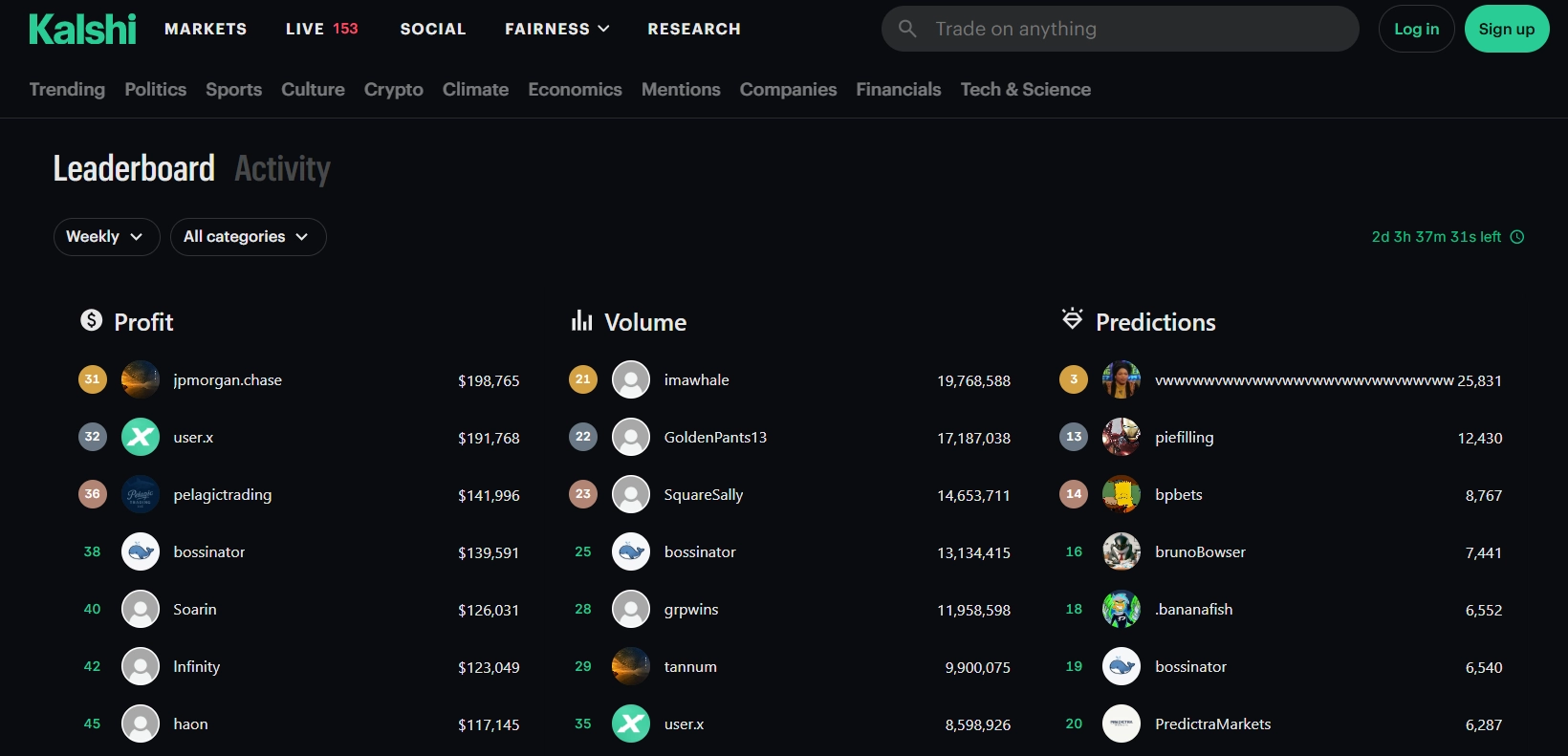
The Kalshi leaderboard tells you who made money. Kreo’s analytics tell you whether the edge is real and whether it is still active. You need both before you copy anyone. Skipping the second step is where most people go wrong.
Start with the leaderboard. Go to kalshi.com/leaderboard, sort by monthly profit, and look for traders with 20 or more consistent wins concentrated in one or two event categories. Volume matters less than concentration. A trader with 50 wins spread across 15 categories is much harder to copy profitably than someone with 30 wins concentrated almost entirely in one, whether that one is Fed decisions, NFL lines, or election markets.
Trader Signal Checklist
- 30+ wins concentrated in 1 category
- Clear focus in one lane (Fed, sports, politics, or crypto), not scattered markets
- Early entries when probability was still low
- Consistent bet sizing across trades
- $4k profit from a single obscure contract
- Trades scattered across 15 categories
- Most entries at 70+ cents, close to resolution
- Wildly different bet sizes with no pattern
Then validate inside Kreo. Paste any trader’s Kalshi username directly into the bot. Kreo returns a full breakdown in about 30 seconds: win rate by category, entry timing score, sizing consistency, and a trend line showing whether their edge is growing or fading. This is the step most people skip, and it is the most important one.
A trader at 71% overall might be 81% on Fed markets and 44% on sports. Kreo’s category breakdown tells you exactly which contracts to mirror. Set a filter and you only copy where their edge is real.
If the trend line is declining, keep looking. If their category win rate is strong, consistent, and the trend is stable or building, you have someone worth copying. Move on to setup.
Step 2: Connect Kreo Bot to Your Kalshi Account
No app download, no wallet setup, no browser extension. Kreo runs entirely inside Telegram and links to your Kalshi account through Privy, an authentication layer backed by Stripe. This is worth understanding clearly, because it works differently from how a crypto trading bot handles custody. Your money never moves into a bot-controlled wallet. It stays in your own account at Kalshi, a CFTC-regulated exchange, the entire time. Privy just hands Kreo a revocable session token so it can place orders on your behalf, not your login, not your funds. You can pull that access at any moment from your Kalshi account settings.
Open Kreo Bot on Telegram
Launch Kreo directly in Telegram. No install required. Works on iOS, Android, and desktop. Open Kreo Bot here.
Authenticate via Privy
Connect your Kalshi account in 2 taps through Privy’s non-custodial auth flow. Your login credentials stay on Kalshi’s servers only. Kreo receives a revocable session token, nothing more. This is the same authentication architecture used by institutional fintech platforms.
Fund Your Kalshi Balance
Kalshi accepts USD via bank transfer or debit card. No crypto involved. Minimum contract size is roughly $10 to $25 depending on the market. You can handle deposits and withdrawals directly through the bot once connected. Once your balance is funded, you can activate copy trading immediately.
Step 3: Activate Copy Trading and Configure Your Settings
Once you have confirmed a trader has real edge in Kreo’s analytics, activation takes under 60 seconds. Every contract they open on Kalshi fires an identical order in your account, with a Telegram notification each time showing the contract name, fill price, and size. Here is how to set it up correctly.
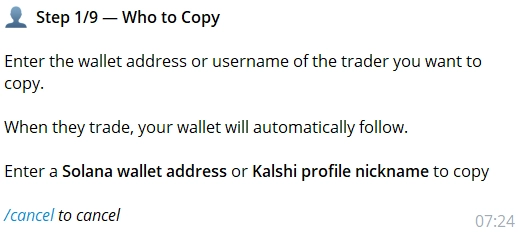
Open the Copy Trading Menu
Tap Copy Trading from the Kreo bot home screen. Everything runs inside Telegram, no external site needed.
Paste the Trader’s Kalshi Username
Kreo loads their full position history so you can review recent activity before activating. Take 30 seconds to confirm the trend is still positive. If anything looks off compared to your earlier analytics check, do not activate yet.
Set Your Copy Size
Choose fixed USD per contract (for example, $10 per position regardless of what the original trader stakes) or proportional (which mirrors their percentage of balance). Fixed sizing is simpler when you are starting out and keeps your total exposure predictable.
Set a Daily Copy Limit
A hard daily cap on total USD deployed from that trader is not optional. Set it before you activate. A high-frequency Fed trader can open 8 contracts on FOMC day. Without a cap, that runs through your balance faster than you expect.
Apply Category and Liquidity Filters
Only mirror the categories where analytics confirmed real edge. The liquidity filter automatically skips contracts where the order book is too thin, which prevents you from getting a worse fill than the original trader received on the same contract.
Activate and Let It Run
Every contract that trader opens on Kalshi fires an identical position in your account with a Telegram notification. The never-miss-trade execution system fires orders during fast-moving market windows, including short 1-hour cycles, without requiring you to be online. You do not need to watch it.
Here is what each setting actually controls and why it matters.
Fixed copies at a flat dollar amount per contract regardless of the original trader’s stake. Proportional mirrors their percentage of balance. Start with fixed so your exposure stays predictable while you learn how the trader behaves.
Hard cap on total USD deployed per day from that specific trader. Non-negotiable. Set it before activating and do not skip this step.
Restricts copies to the categories where analytics confirmed edge. Strong on Fed, weak on sports? Filter to Fed and CPI only and ignore everything else they touch.
Auto-skips contracts with a thin order book. This prevents fill quality worse than what the original trader received on the same contract.
Set take-profit and trailing stop-loss levels per position. Exits automatically at your target or locks in gains if the contract moves against you before resolution. No manual monitoring needed.
Define when and how your copy trades execute. Schedule entries around specific event windows, pick your execution mode, and let the bot handle timing completely while you are away.
Prevents unwanted position stacking when a trader reopens a contract you already hold. Useful if the trader you follow tends to add to existing positions.
Every copy fires a Telegram notification with contract name, fill price, and position size so you always know what just executed.
One Trading Day: A Specialist in Action
Settings on a page are one thing. Here’s roughly what they look like doing their job on a day that actually moves, and the mechanics below play out the same way whether the specialist you’re copying trades Fed decisions, election markets, or Sunday’s NFL slate. The example uses a Fed rate decision because it has one clean trigger moment that makes the timing easy to follow, but swap in a kickoff or a debate night and the settings behave identically.
Say you’ve copied a trader who tested strong specifically on Fed rate decisions, verified through Kreo’s category breakdown before you activated anything. FOMC day arrives. The announcement lands at 2:00 PM ET, and this trader is active in the run-up, positioning ahead of the release the way their history said they would.
You’d set a fixed $10 per contract and an $80 daily cap on this trader specifically. By 1:40 PM they’ve opened six positions. Six Telegram notifications land in your chat in under twenty minutes, each showing the contract, fill price, and size. You’re at $60 deployed, still under the cap. A seventh entry at 1:52 PM pushes you to $70. When they open an eighth around 1:58, two minutes before the release, Kreo blocks it. The cap did exactly what it was there for, and that eighth entry was also the most rushed one of the day, nothing like the early positioning that made this trader worth copying in the first place.
The category filter matters just as much here, for any specialist. If this same trader also dabbles in sports contracts on the side and you’d left copying wide open instead of restricting to Fed and CPI, you’d have mirrored those too, diluting the exact edge you checked before you started. Follow a sports specialist instead, and the same rule applies in reverse: restrict to sports, don’t let a stray macro bet ride along on the same wallet. The filters aren’t just risk management. They’re what keeps your copy trading matched to the specific thing you verified, instead of everything that trader happens to touch.
How to Track Whether Your Copy Trading Is Actually Working
Watch win rate by event category, not total PNL. If your Fed win rate is 68% but your overall is 51%, you are accidentally copying their off-category trades, sports, politics, whatever else that wallet touches. Tighten the category filter and the blended number improves immediately. Total PNL alone will not tell you that.
Kreo’s dashboard inside Telegram shows live PNL, open positions, and a full copy trade log, with charts that update in real time as buy and sell activity comes in. The web hub at kreo.app gives you the same view in a browser with additional portfolio detail across all your copied traders at once.
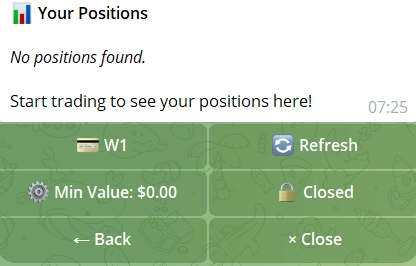
- 📊 Live PNL on every open copied contract, updated in real time
- 🏆 Category win rate split by event type, not a blended number that hides what is dragging you down
- ⏱️ Entry timing score confirms you entered early, not after momentum had already shifted
- 📋 Copy trade log with contract, fill price, size, trader, and resolution result
- 📉 Trader trend line shows fading edge 2 to 3 weeks before the leaderboard position drops
- 📊 Live charts in Telegram with real-time buy/sell updates and advanced filtering
- 🔄 Auto-merge and Sell All: positions consolidate automatically; one tap exits everything instantly
- 🌐 Kreo Web Hub at kreo.app for full portfolio view on desktop
- 👥 Multi-trader view with all copied traders in one dashboard
- 🔔 Alert history with a full log of every Telegram notification sent
Rotate your copied traders every 2 to 4 weeks. The trend line inside Kreo shows a fading trader 2 to 3 weeks before their leaderboard position drops. Rotate when the trend turns, not after the damage is already done.
What Else Kreo Can Do Beyond Copy Trading
Copy trading is the main reason most people come to Kreo, but it is not the only tool. The full toolkit includes Auto Trade for sports and other markets, volume spike detection, limit orders, trailing stop loss, a live market feed, and auto rebalancing, all from inside Telegram with nothing else to install.
- 🚀 Auto Trade runs fully automated strategies on your behalf, including dedicated sports auto-trading, without you needing to monitor anything
- 💰 Limit Orders set a target entry price; Kreo executes when the contract hits it
- 🔍 Unusual Activity Detector notifies you when smart money moves before price adjusts
- 📉 Trailing Stop Loss locks in gains automatically without manual monitoring
- 📰 Live Market Feed delivers Kalshi event updates directly to Telegram
- 👛 Trader Activity Tracker monitors any trader’s entries without activating full copy trading
- ⚖️ Auto Rebalancing prevents any single category from dominating your total exposure
- 🤖 Custom and backup bots: build your own automated bot or set a backup to take over if the primary goes offline, keeping execution uninterrupted
- 👥 Multiple Trader Copies: copy 2 to 3 specialists simultaneously with separate settings per trader
- 🌐 Kreo Web Hub desktop portfolio dashboard at kreo.app
One honest limitation worth knowing: Kreo launched in early 2026. The platform has a shorter track record than more established trading tools, and some features are still being refined. Kalshi is also US-regulated, which makes it inaccessible from certain jurisdictions. Check your eligibility at kalshi.com before setting up.
The Real Risks of Kalshi Copy Trading You Should Know
Copy trading closes the execution gap but does not change the underlying probability of any contract. You still need to pick the right traders and size correctly. The people who lose money on copy trading usually made one of these five mistakes.
- 📉 Copying someone mid-cold-streak: always check the recent trend line in Kreo, not just all-time stats. A trader at 78% in Q4 might be at 52% today. A downward trend is your signal to keep looking, not to copy and hope it recovers.
- 💸 Putting your entire balance on one trader: copy 2 to 3 specialists across different categories. When one is cold, the others carry. Set individual daily limits per trader and do not combine them into one pool.
- ⚡ Fill price slippage on fast-moving contracts: price can shift slightly between the original trader’s fill and yours on high-volume events. The liquidity filter in Kreo minimises this by skipping contracts where the order book is too thin to give you a comparable fill.
- 🗓️ Fed specialist goes cold between FOMC meetings: category filters in Kreo skip everything outside their confirmed edge area automatically. Turn this on from day one, not after you have already copied a few bad sports bets from a macro specialist.
- 🚨 High-frequency trader depletes your balance in a single day: set a daily USD cap so a busy news day cannot exceed your intended weekly exposure in one session.
One more practical note: fee transparency is a current gap with Kreo. Trading fees and subscription costs are not publicly listed. Ask Kreo directly before you scale position sizes, so there are no surprises when you look at your actual net returns versus gross PNL.
Frequently Asked Questions
Kalshi copy trading automatically mirrors another trader’s Kalshi contracts in real time. When the trader you follow opens a position, an identical order fires in your account at the same price. Kreo Bot handles this entirely inside Telegram with no manual execution needed on your end.
Start with the Kalshi leaderboard sorted by monthly profit and look for traders with 20 or more wins concentrated in one or two event categories. Then paste their username into Kreo’s analytics to see win rate by category, entry timing score, and whether edge is building or fading before you copy a single dollar.
In your own account at Kalshi, a CFTC-regulated exchange, the entire time. It never moves into a bot-controlled wallet. Kreo connects through Privy, backed by Stripe, and only ever holds a revocable session token, never your login or your funds. That’s a different custody model than a crypto trading bot with a self-custody wallet, and it’s worth understanding rather than assuming they work the same way. The market risk on any individual contract is separate from all of this: a well-connected account can still lose on a bad pick, which is exactly why vetting the trader in Kreo’s analytics and setting a daily cap before activating matters more than the custody question itself.
Kalshi’s per-contract minimum runs roughly $10 to $25 depending on the market, and Kreo charges no deposit minimum of its own. But that’s the price of one contract, not a realistic trading budget. If you’re copying 2 to 3 traders with individual daily caps, something like $80 to $150 per trader in that cap is a more realistic starting point than the bare contract minimum, unless you’re comfortable hitting your cap after a single fill.
Yes. Kreo supports copying 2 to 3 specialists simultaneously, each with separate copy size, daily limit, and category filter settings. This spreads your risk across traders with different category strengths rather than depending entirely on one leaderboard position.
Kreo supports both Kalshi and Polymarket through separate dedicated bots. KreoKalshiBot handles the CFTC-regulated Kalshi markets. KreoPolyBot covers Polymarket. Both run inside Telegram and share the same analytics and copy trading architecture, so switching between them is straightforward.
Resources
Related Articles