⚡ TL;DR – How to Copy Trade on Solana with Trojan Bot?
To copy trade on Solana with Trojan Bot, launch the bot in Telegram, create a wallet, fund it with SOL, paste a smart wallet address into the CopyTrading feature, and set trade size and slippage. The bot will automatically mirror trades in real time on the Solana blockchain.

Solana copy trading is a go-to strategy for traders who want to follow results, not rumors. By copying the moves of smart wallets (wallets with a consistent profit history) users can ride trends earlier.
One of the easiest ways to get started is with Trojan Bot, a Telegram-based trading tool that offers:
- Smart wallet tracking on the Solana blockchain
- Real-time copy trading synced directly with high-performing wallets
- Token sniping tools for new launches
- Instant wallet creation and management inside Telegram
Why Trojan is the Best Bot for Copy Trading on Solana
Trojan Bot is one of the leading Telegram trading bots on Solana in 2026, giving traders a serious edge in the Solana ecosystem by combining speed, automation, and real-time insights, all inside Telegram.
- Instant Wallet Setup: Create a secure Solana wallet without third-party apps.
- Copy Smart Wallets: Track and mirror the top-performing wallets in real time.
- Sniping Launches: Enter new tokens at launch before the crowd.
- Risk Control: Customize slippage, trade size, and token filters easily.
- All-in-Telegram: No browser tabs, just powerful tools in your Telegram app.
If you’re looking for an all-in-one tool for Solana copy trading, automated wallet tracking, and meme coin sniping, Trojan Bot is fast, flexible, and battle-tested by real traders.
Trojan Bot Performance in 2026
As of 2026, Trojan remains one of the fastest Solana Telegram trading bots, especially during high-volume meme coin launches. Execution speed, wallet synchronization, and automated copy trading performance remain competitive compared to browser-based Solana tools.
In fast markets where liquidity rotates quickly, having a real-time Solana copy trading bot inside Telegram reduces manual friction and improves entry precision. For active traders, that execution difference can directly impact profitability.
Step 1: Get Started with Trojan Bot
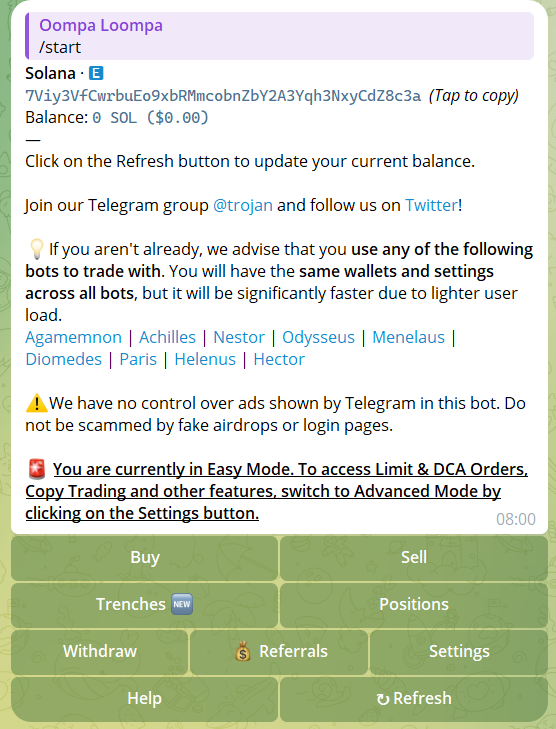
Launch Trojan Bot in Telegram and click /start to activate it.
The bot generates a secure Solana wallet for you, so you don’t need Phantom or any third-party wallet.
Fund your Trojan wallet with SOL: you can send SOL directly from an exchange like Binance or Coinbase. Start small, maybe 1–2 SOL, just to get a feel for it.
Step 2: Find Smart Wallets to Copy
Trojan Bot includes wallet suggestions, but you can level up your Solana copy trading strategy by digging deeper.
2.1 Use DexScreener to Spot Trends
- Visit DexScreener and select the Solana blockchain.
- Look at trending tokens over the past 6 hours with high volume and steady price action.
- Click transaction details to find wallet addresses involved in early buys.
2.2 Analyze Wallets with Solscan
- Go to Solscan and paste the wallet address.
- Look for:
- Consistent Profits over time
- Token Diversity: not just 1 pump
- Smart Timing: early buys, well-timed exits
2.3 Use Zelfiguru for Advanced Metrics
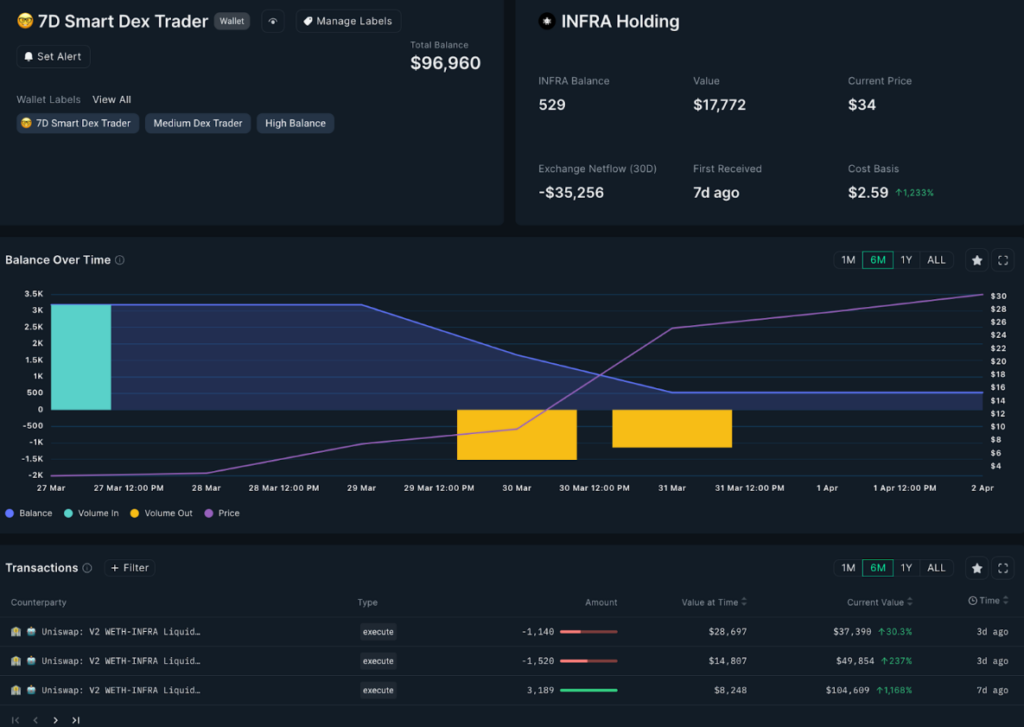
- Open Zelfiguru in Telegram and paste the wallet address
- Check ROI, win rate, and recent activity
- Focus on wallets with strong performance over the past 7 days
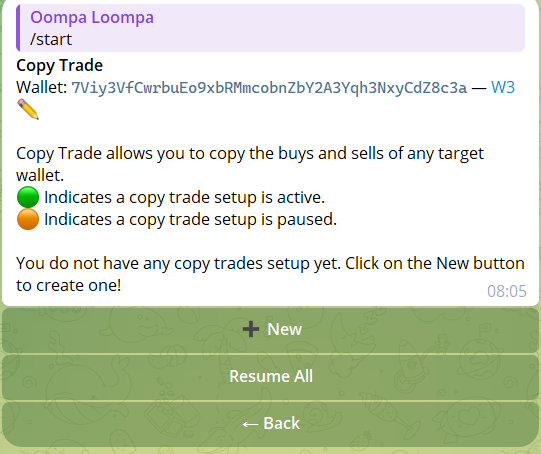
Step 3: Start CopyTrading with Trojan Bot
Once you’ve found a wallet worth following, Trojan Bot makes it easy to mirror its trades automatically using automated Solana wallet copy trading.
- Paste the wallet address into Trojan’s CopyTrading feature
- Set your trade size (e.g. 0.1 SOL per trade)
- Customize filters like slippage % and token exclusions
The bot will automatically sync and execute the same trades in real time on the Solana blockchain.
Step 4: Use Trojan Bot’s Sniping Feature
Trojan’s sniping tool lets you enter new token launches the moment they appear, making it one of the most effective Solana meme coin sniper bots in 2026.
- Enable sniping inside the bot and set parameters like max slippage and trade size
- Monitor DexScreener for upcoming token launches
- Paste the contract address into Trojan to snipe it instantly
Pro Tip: Combine wallet tracking and sniping. Find wallets that snipe early and copy them.

Step 5: Stay Updated and Optimize
The Solana market changes fast. Don’t set it and forget it: review, adapt, and improve constantly.
- Check Step Finance to monitor liquidity pools and wallet behavior
- Join active Telegram groups to spot trending tokens early
- Review your CopyTrading results and replace underperforming wallets
My Trojan Bot Experience
Compared to browser-based Solana wallets like Phantom, Trojan removes the execution delay caused by manual confirmations and tab switching. When sniping fast-moving meme launches, even a few seconds can mean the difference between entering early or buying the top. By operating fully inside Telegram with automated execution, Trojan provides a measurable speed advantage for active Solana copy traders.
If you want a full breakdown of features, fees, and security, you can read my detailed Trojan Telegram Bot review before getting started.
When I first started using Trojan Bot for Solana copy trading, I played it safe. I followed a low-risk smart wallet focused mainly on large caps like SOL and USDC rotations. The growth wasn’t explosive, but it was consistent. In just one week, I closed roughly +10% profit without constantly monitoring charts.
After understanding how the CopyTrading system synced trades in real time, I tested a more aggressive strategy. I copied a high-risk wallet that specialized in early meme coin snipes on Solana. Within three days, my initial 1 SOL grew to 1.5 SOL. Higher volatility, yes — but also significantly higher upside.
What makes Trojan powerful is flexibility. You’re not locked into one style. You can rotate between conservative wallets and high-risk snipers, adjust position sizing, control slippage, and refine filters as market conditions change. That adaptability is critical in the Solana ecosystem, where liquidity and narratives shift fast.
Of course, results depend entirely on the wallets you choose and your risk management. Copy trading is not magic — but with proper wallet analysis and disciplined sizing, Trojan turns Solana wallet tracking into a structured, repeatable strategy instead of emotional trading.
FAQs | Copytrading on Solana
What is Trojan Bot and how does it work on Solana?
Trojan Bot is a Telegram-based trading bot that lets you create a wallet, copy top-performing wallets, and snipe token launches directly on the Solana blockchain. It works entirely inside Telegram with fast execution and full control over trading settings.
Is copy trading on Solana with Trojan Bot safe?
Copy trading is as safe as the wallets you follow: Trojan doesn’t guarantee profits but gives you the tools to track and copy smart traders. Always start with small amounts and avoid pasting unknown contract addresses.
How do I find the best wallets to copy with Trojan Bot?
You can use tools like Solscan, DexScreener, and Zelfiguru to analyze wallet history, ROI, and trading patterns. Trojan also provides suggested wallets based on performance.
What’s the minimum amount to start using Trojan Bot?
There’s no official minimum, but most users start with 0.3-2 SOL to test the features and copy trades. The bot works well with small trades, and you can scale up anytime.
Can I use Trojan Bot to snipe new tokens at launch?
Yes, Trojan has a built-in sniping feature that lets you enter new token launches early. You can customize slippage, trade size, and use it alongside wallet tracking.
What are the risks of using Telegram trading bots like Trojan?
The main risks are market volatility, rug pulls, and following bad wallets. Use reputable tools, double-check contracts, and avoid risky tokens with no liquidity.

About the author
Learn more about us or contact us
![[LIVE] Top Polymarket Smart Wallets for Copy Trading](https://telegramtrading.net/wp-content/uploads/2026/03/Smart-Wallets-for-CopyTrading-on-Polymarket.jpg)
![[Full Guide] How to Copy Trade on Kalshi Using Kreo Bot](https://telegramtrading.net/wp-content/uploads/2026/03/kalshi-leaderboard-monthly-profit.png)
![[TUTORIAL] How to Copy Trade Smart Wallets on Polymarket Using PolyGun](https://telegramtrading.net/wp-content/uploads/2026/03/polymarket-leaderboard-monthly-profit.png)