
Shuriken is a multi-chain crypto trading platform you can use as a Telegram bot or a web terminal, built for traders who want one tool that works across 7 blockchains. The big upgrades in 2026 are Agent Keys: a simple way to let an AI agent like OpenClaw watch your alpha groups and place trades for you, inside the spending limits you set; natural language commands on X and Telegram so you can trade just by talking; and Shuriken Labs, where you can build, share, and monetize your own AI trading agents. And with the new Shuriken API and free SDK, anyone who can write a bit of code can build on the same engine that powers the bot.
Key Takeaways
- Trade across 7 chains: Solana, Ethereum, Base, BSC, Avalanche, Sui, and TRON.
- Agent Keys let AI agents like OpenClaw trade for you, with limits you control.
- Talk to your account in plain English on X or Telegram, no commands needed.
- Shuriken Labs: build, share, and monetize your own AI trading agents.
- No subscription. 1% per trade, 0.9% with a referral link.
What Is Shuriken?
If you’ve used Banana Gun, Maestro, or Trojan, Shuriken plays in the same space but goes further. Those bots stop at execution. Shuriken handles the full loop: it finds the alpha, helps you research it, and (if you want) places the trade for you through an AI agent, or as simply as typing a message to it on X or Telegram in plain English.
The numbers so far: $700M+ in trading volume, $7.9M in fees generated, and 40,000+ active traders. You can use the Telegram bot for fast trades on your phone, or the web terminal for deeper research and Agent Key setup. Both share one account and one wallet, so you switch between them without missing a beat.
Core Features
Shuriken’s features split into three groups: fast trading tools, alpha tracking, and quality-of-life extras. Here’s the full list:
Fast trading and execution
- 🎯 Multi-chain Sniping: buy tokens the second they launch on Solana, Ethereum, Base, BSC, Avalanche, Sui, and TRON. Set custom tip amounts per chain.
- ⚡ Quick Swap: paste a token address, set the amount, hit buy. Built for acting on calls within seconds.
- 🛡️ MEV Protection: blocks front-running and sandwich attacks by talking directly to major block builders.
- 👥 Group Sniping: bundles snipes from multiple users into one big transaction. Better odds of getting in first, lower fees per person.
- 🐛 Rug Detection: simulates pending blocks to predict rug pulls before they happen. Group bundling can also front-run sneaky dev sells.
- 📊 Advanced Orders: take-profit, stop-loss, and limit-buy automation across all 7 chains.
- 🌉 Cross-Chain Swaps: move funds between Solana, Base, and BNB right from the wallets menu, powered by deBridge and ChangeNOW.
Alpha tracking
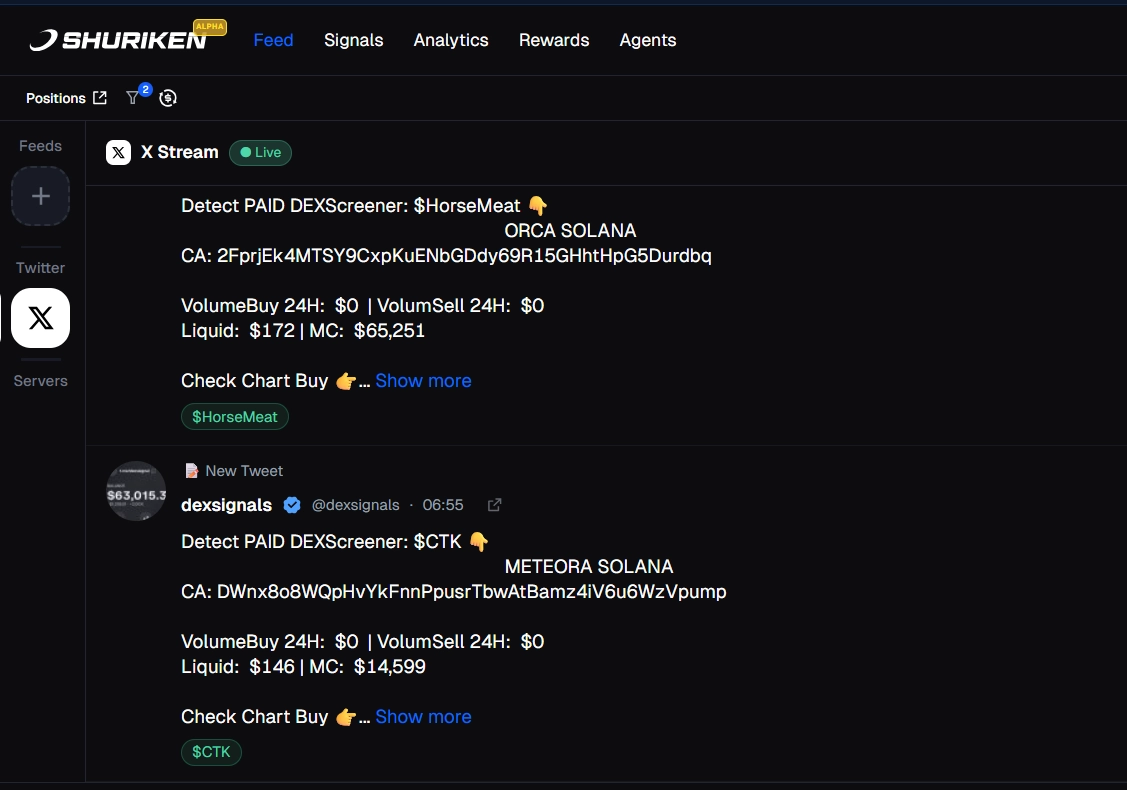
- 📡 Alpha Stream: watches unlimited Discord and Telegram groups at once. Picks up token addresses automatically and shows a one-click buy button next to each one.
- 🐦 X Stream: pulls Twitter alpha into the same feed. No second tab, no copy-paste.
- ⚔️ Memeblade: real-time on-chain token discovery. Filter by market cap, volume, bond status, and more. Buy from any token card with one click. Set sound alerts when something matches your filters. Solana is live now, more chains coming.
Quality of life
- 🗣️ Natural Language on X and Telegram: talk to your Shuriken account the way you’d talk to a person. Saw something interesting on X? Reply “@ShurikenTrade, buy 1 SOL if my groups think this is bullish.” Want a quick check-in? Message the Telegram bot “summarize my portfolio.” Done. No commands to look up, no menus to navigate.
- 🧩 Profiles: link multiple wallets, plus your Discord and Telegram, into one identity. Import watchlists from Axiom, GMGN, Padre, or Ray Bot.
- 🤖 Akira AI Assistant: ask questions about DeFi, your holdings, or past trades, right inside the platform.
- 🧹 Sweep: claw back SOL from unused token accounts and sell dust balances in one batched transaction. Less clutter, fewer fees.
- 🔌 Public API and SDKs: same engine as the bot, available to developers (more on this below).
The standout here is Alpha Stream. If you’re in 20+ Discord and Telegram groups, it’s physically impossible to read every message. Alpha Stream reads them all for you, pulls out the contract addresses, and gives you a one-click buy button. You go from drowning in chat to a clean, ready-to-trade feed.
Coming soon: an AI Co-Pilot that answers market questions in plain English, an X Agent for trading from Twitter, more login options (Email, Google, Phantom, Telegram), and a unified Multi-Chain Bridge for one-step transfers.
AI Trading with Agent Keys
This is what makes Shuriken stand out in 2026. Agent Keys let you connect an AI agent to your trading account so it can monitor alpha and place trades for you, while you keep full control over what it’s allowed to do.
What’s OpenClaw?
OpenClaw is a self-hosted AI agent built by developer Peter Steinberger. You run it on your own computer (a Mac Mini works fine). It launched in November 2025, went viral in early 2026, and now has over 2 million users. The ClawHub marketplace hosts 13,700+ skills, with 311+ in finance and investing alone.
If self-hosting sounds like a hassle, you’ve got easier options. Claude Desktop and Cursor both work with Shuriken Agent Keys out of the box, just paste your key into the settings. No local server needed.
How Agent Keys keep you safe
An Agent Key is just a string you paste into your AI agent. But before you create one, you set the rules: how much per trade, how much per day, and what the agent is allowed to do. Those limits are locked on Shuriken’s servers. The agent can’t go past them no matter what someone tries to tell it.
And here’s the key part: no Agent Key can withdraw or transfer funds, ever. The worst thing a confused agent can do is make a bad trade. Your wallet is never at risk of being drained.
You also get an instant kill switch in the dashboard and a full activity log showing exactly what the agent did and when.
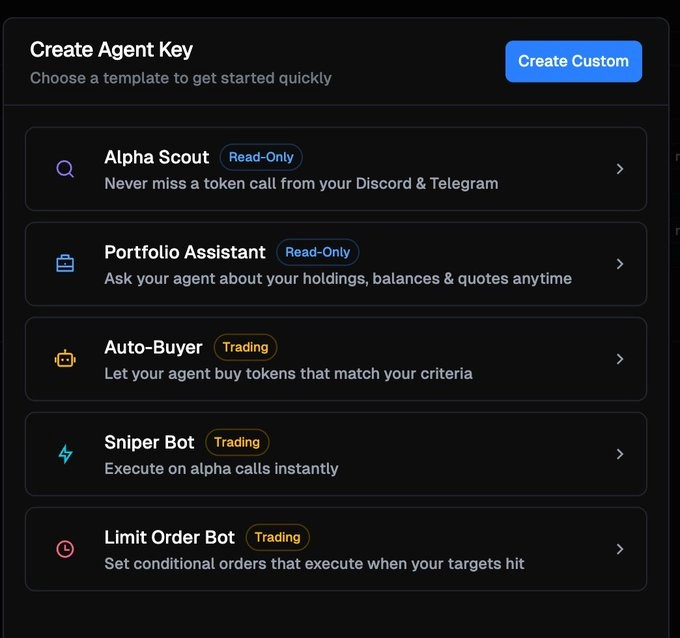
The 5 preset templates
Pick the one that matches how much automation you want:
- 👁️ Alpha Scout (read-only): watches your alpha groups, looks up prices and stats, tracks how calls perform. Can’t see your wallet. Can’t trade. Best place to start.
- 💼 Portfolio Assistant (read-only): sees your wallet balances and holdings, checks your P&L, gets quotes. Still can’t execute anything.
- 🛒 Auto-Buyer (trades): buys tokens that match your rules. Default caps: $50 per trade, $500 per day.
- 🎯 Sniper Bot (trades): fires the moment a contract address shows up in your alpha groups. Default caps: $25 per trade, $250 per day.
- 📉 Limit Order Bot (trades): places conditional orders when your price targets are hit.
You can also build a custom key if you want more granular control than the presets give.
Here’s the kind of scenario this is built for: alpha drops in your Discord at 3 AM. Your agent picks up the contract address through Alpha Stream, checks liquidity and holders, and buys within your limits. You wake up already in position. For comparison, here’s how a more traditional multi-chain bot handles execution without any AI layer in our Maestro Bot review.
Pick Your AI Strategy
The 5 presets are starting points. Here are the actual setups traders are running, sorted from most cautious to most hands-off:
- 👁️ The Alert-First Trader: run Alpha Scout only. Your agent flags and summarizes every call across all your groups. You still pull the trigger yourself. Great first setup if you want intelligence without giving the agent any wallet access.
- 😴 The Passive Accumulator: run Auto-Buyer with strict rules. For example: only buy tokens called in 3+ groups, max $100 to $200 a day. Let it work overnight, check your bag in the morning.
- ⚡ The Sniper Setup: connect Sniper Bot to one trusted alpha group. Set a $25 cap per trade. The agent buys the second a contract drops; you handle exits manually.
- 🔁 The Full Stack: Alpha Scout watches 20+ groups, Auto-Buyer executes on matches, Limit Order Bot handles your exits. End-to-end automation. Just check the activity log each morning.
- 🔍 The Researcher: Portfolio Assistant + Alpha Scout, both read-only. Use it to audit your positions against what the groups are calling. Zero trading risk, max insight.
One thing to keep in mind: the agent is only as good as the groups you feed it. If your sources are noisy, your trades will be too. The traders getting the best results curate their groups carefully and feed only the high-signal ones into Alpha Scout.
Shuriken Labs
Agent Keys let you connect existing AI agents to Shuriken. Shuriken Labs goes one step further: it’s where you build your own. Labs V1 went live on May 2, 2026.
In Labs, you can create AI trading agents from scratch, share them with other traders, and eventually monetize them. Each agent you build can:
- 🔎 Research from multiple sources: pull signal from your alpha groups, X, and the broader web simultaneously.
- 💱 Execute trades: act on what it finds, inside the same server-enforced spending limits as any Agent Key.
- 🛡️ Run risk and safety checks: guardrails are baked into the Labs framework you don’t need to wire them in yourself.
- 📊 Manage your portfolio: rebalance, track P&L, and manage positions automatically.
The agent loop in Labs follows a simple structure: Task, Trigger, Deliver. The trigger layer is being expanded significantly in the next update, with three new trigger types rolling out. Alpha triggers fire the moment a caller you trust posts a token to your X, Discord, or Telegram feeds. Schedule triggers let you set a time and cadence for anything you want, whether that’s the top 10 viral memes every four hours or a daily portfolio recap. On-chain triggers watch wallet activity and pool migrations, so the agent fires the moment a tracked wallet enters a new token or a migration matches your keyword filter. Everything else is what you build on top.
The practical difference from building with the API: no API keys to manage, no MCP server to configure. Install an agent from Labs and it’s running in under 10 seconds. The safety rails and the chain connections are already there. You’re just defining the logic.
Labs is the answer to a question a lot of power users have had: “What if I want something more custom than the presets, but I don’t want to stand up my own infrastructure?” You build the agent, Shuriken handles everything underneath it.
Setup Guide in 6 Steps
You can be up and running in under 30 minutes. Here’s how:
Open Shuriken and Create Your Wallet
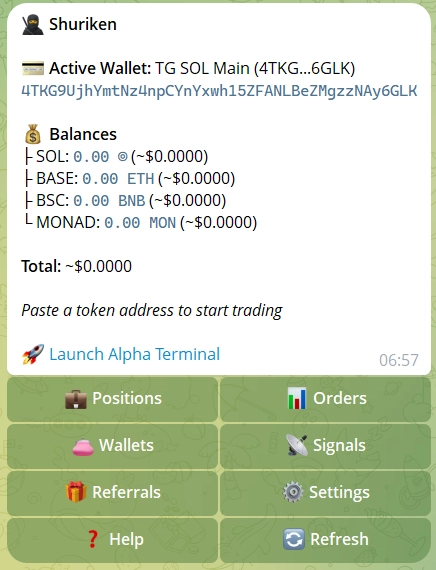
Open Telegram and launch the Shuriken bot. The setup flow generates a non-custodial wallet (you hold the keys). Prefer a browser? Use the web terminal instead. Same account, same wallet.
Fund Your Wallet and Connect Alpha Stream
Send some funds to your new wallet on the chain you want to trade. Then open Alpha Stream and add your Discord and Telegram alpha groups. Shuriken will start picking up token addresses from those groups and showing one-click buy buttons.
Create an Agent Key
Go to Agent Keys in the dashboard. For your first one, pick Alpha Scout (read-only). Set per-trade and daily caps before saving. These caps are locked on the server, the agent can’t change them.
Connect Your AI Agent
Copy the Agent Key. Paste it into OpenClaw, Claude Desktop, or Cursor following the steps in the Shuriken docs. Connection activates right away. The agent only gets the permissions you set. Or skip the external agent entirely and just talk to Shuriken directly on X or Telegram in plain English.
Run Read-Only for a Few Days
Before you give the agent any trading power, let it run in Alpha Scout mode for 2 to 3 days. Check the activity log: are the calls it’s surfacing the kind you’d want to act on? If yes, you’re ready for the next step. If not, fix your group sources first.
Scale Up Gradually
Happy with read-only? Move up to Auto-Buyer or Sniper Bot with low caps ($50 to $100 a day). Check the activity log daily. If anything looks wrong, hit the kill switch in the dashboard. Raise the caps only after a solid week of clean behavior. When you’re ready to go fully custom, explore Shuriken Labs to build agents tailored to your exact strategy.
Build on Shuriken: API and SDK
This section is for developers. If you don’t write code, feel free to skip ahead.
The Shuriken API is live, and it runs on the same engine as the terminal and bot. Same routing, same execution quality, same safety rails. You’re not getting a watered-down third-party wrapper.
The API covers Solana, Base, and BSC through one unified interface. You can:
- 💱 Get quotes and execute swaps: pull live prices and place trades programmatically. Shuriken handles routing on the backend.
- 📊 Track portfolios: read wallet balances and positions across all chains in one call.
- 🔎 Pull token data: search tokens, get metadata, fetch price history (OHLCV), query pool data.
- ⚙️ Set trigger orders: limit orders and stop-losses based on price, market cap, or liquidity. Same logic as the in-app orders.
⚙️ The Shuriken SDK
To make building even easier, Shuriken just released open-source SDKs in TypeScript and Rust. Tokens, wallets, swaps, balances, alpha, pools, all from your code:
- 🆓 Free WebSocket and REST access.
- 🧱 Typed clients in TypeScript and Rust.
- 📡 Real-time streams across Solana, Base, and BSC.
- 🛠️ Quickstart repos with working examples ready to go.
- 🔑 Agent Key auth, the same key you already use for your AI agent.
Grab the SDKs here:
- 🟦 TypeScript SDK: github.com/ShurikenTrade/shuriken-sdk-ts
- 🦀 Rust SDK: github.com/ShurikenTrade/shuriken-sdk-rs
🧰 Agent Kit: CLI, SDK, and MCP
Shuriken’s Agent Kit now ships in three surfaces, covering the full wallet lifecycle end-to-end:
- ⌨️ CLI: agents shell out directly from their loop.
- 📦 SDK: builders ship trading apps and bots.
- 🔌 MCP: agents call structured tools.
All three now support the full wallet lifecycle:
- 💳 Create a fresh wallet group — N empty wallets, your label.
- 💧 Fund privately via SplitNow. Cross-exchange routing breaks the link to the source.
- 🎯 Trade from any wallet in the group across Solana, Base, and BSC.
- 🧹 Retire when you’re done — move funds back to a wallet you pick, group archives on the last call.
Vibe coders are already using it to build sniping systems, automated wallet management tools, and market-making setups. Busy traders connect agents like OpenClaw and Claude Cowork to the CLI or MCP to access alpha and manage portfolios during daily agentic workflows. One Agent Key works across all three. Free and open source.
Builders are already using it for custom trading bots, automated strategies, portfolio alert systems, analytics dashboards, and what the team calls “vibe-coded” trading apps: small tools built quickly around a specific edge. The API removes the usual headache of writing your own chain connections and swap routing from scratch. If you’d rather skip the API entirely and just run something pre-built, Shuriken Labs is the no-code path to the same outcome.
Full docs at docs.shuriken.trade. It’s free. Build whatever you want. 🚀
Pros and Cons of Shuriken

Pros and Cons
- Best AI agent integration of any trading bot right now
- Alpha Stream watches unlimited groups so you don’t miss calls
- Memeblade adds real-time on-chain token discovery
- Natural language trading on X and Telegram no commands to memorize
- Shuriken Labs lets you build, share, and monetize your own AI agents
- Spending limits are locked server-side and cannot be bypassed
- No Agent Key can withdraw funds, your wallet stays safe
- Free public API with open-source TypeScript and Rust SDKs
- No subscription: 1% per trade, 0.9% with a referral
- Open beta, some features are still being polished
- OpenClaw self-hosting takes a bit of setup (Claude Desktop is easier)
- Memeblade is Solana-only for now, more chains on the way
- API and SDK currently support Solana, Base, and BSC (more coming)
Is Shuriken Safe?
The clearest proof is in the architecture. If you set a $50 cap per trade, the agent literally cannot send a bigger order. There’s been a few cautionary tales out there (the $LOBSTAR incident, where an OpenClaw agent over-executed a trade after misreading a request) and Shuriken’s setup is built specifically to prevent that. The same guardrails apply to agents built in Shuriken Labs safety rails are baked in by default, not something you have to add yourself.
The platform is in open beta, so the smart move is to start with a read-only Agent Key, watch the activity log for a few days, and scale up only when you’re comfortable with what you see. That’s the same approach we’d recommend for any new tool, AI or not.
Frequently Asked Questions
A multi-chain crypto trading platform (Telegram bot + web terminal) that covers 7 blockchains and lets you connect AI agents like OpenClaw to monitor alpha and trade for you, talk to your account naturally on X or Telegram, and build custom agents in Shuriken Labs all within spending limits you control.
You generate an Agent Key in Shuriken, set your limits and permissions, then paste the key into OpenClaw or Claude Desktop’s MCP config. The AI agent can then watch your groups, research tokens, and trade inside the limits you set. Withdrawals are never available to any key type.
Yes. Shuriken supports natural language commands directly on X and Telegram. You can message something like “@ShurikenTrade, buy 1 SOL if my groups think this is bullish” on X, or ask the Telegram bot to “summarize my portfolio” and it handles it. No special command syntax needed.
Shuriken Labs is where you build your own AI trading agents. Each agent can research alpha from groups, X, and the web; execute trades; run risk checks; and manage your portfolio. No API keys or MCP setup required install and run in 10 seconds, with safety guardrails baked in. You can share agents with other traders and eventually monetize them. Labs V1 went live on May 2, 2026.
Yes, when you set sensible limits. Spending caps are enforced on Shuriken’s servers, so the agent can’t go past them. No key can withdraw or transfer funds. The worst-case outcome of a bad agent decision is a single losing trade. You also get a kill switch and full activity logs.
Trading covers 7 chains: Solana, Ethereum, Base, BNB Chain (BSC), Avalanche, Sui, and TRON. Cross-chain swaps between Solana, Base, and BNB are built in via deBridge and ChangeNOW. The API and SDK currently support Solana, Base, and BSC.
Memeblade is Shuriken’s real-time token discovery feature. It mixes on-chain data with social signals so you can find new and trending tokens, filter by market cap, volume, and bond status, set sound alerts, and buy with one click. It’s live on Solana now, with more chains on the way.
Yes, completely free and open source. The SDKs are typed clients in TypeScript and Rust that wrap the Shuriken API. You get free WebSocket and REST access, real-time streams across Solana, Base, and BSC, and quickstart repos with working examples. Use your existing Agent Key to authenticate. Get them at github.com/ShurikenTrade.
Anything you want. Custom trading bots, automated strategies, dashboards, portfolio alerts, or quick “vibe-coded” tools around a specific edge. The API covers quotes, swaps, portfolio tracking, token search, OHLCV price history, pool data, and trigger orders across Solana, Base, and BSC. If you’d rather skip the code, Shuriken Labs lets you do the same thing without any setup.
1% per trade. No subscription, no setup fee. With a referral link the fee drops to 0.9%. Agent Keys are free to create, you only pay when a trade actually happens.
Not at all. Shuriken works as a regular Telegram bot and web terminal on its own. OpenClaw, Claude Desktop, and Cursor are optional extras for traders who want AI automation. Most users start without an agent and add one later.
Resources