
At a glance
- Launched: 2022
- Chains: 15, from Solana and Ethereum to Arc, Stable and Robinhood Chain
- Fee: flat 1% per successful buy or sell, up to 30% cashback
- Premium: $200 a month (optional)
- Custody: non-custodial, keys stored with AES encryption
- Official links: Maestro on X · Maestro documentation
Maestro bot verdict: 15 chains in one Telegram bot
One Telegram chat for 15 networks is Maestro's real selling point. You can hold an Ethereum position and a Solana position at the same time, then chase a fresh launch on Base or Monad without opening another app or a browser terminal.
Maestro launched in 2022 and built its name on patented Anti-Rug technology. It has since grown to 573,000 users and more than $12.8 billion in lifetime volume. It's a non-custodial bot: sniping, copy trading and portfolio management all happen inside one private chat.
That breadth is why people hunting for a Solana sniper bot often end up here anyway. Maestro covers Solana, plus everything else they might trade next.
- Best for: traders active on several chains who want automated orders and built-in protection in one place.
- Skip it if: you need a web dashboard, or you only trade one chain and want the leanest tool for it.
What changed in Maestro 2.0
The 2.0 update reworked execution, orders, wallets and DEX coverage, not just the look. The headline additions are Limit Orders 2.0 with laddering and staged exits, a single Positions Ledger, faster execution and new integrations such as Uniswap V4, Raydium LaunchLab and Boop.
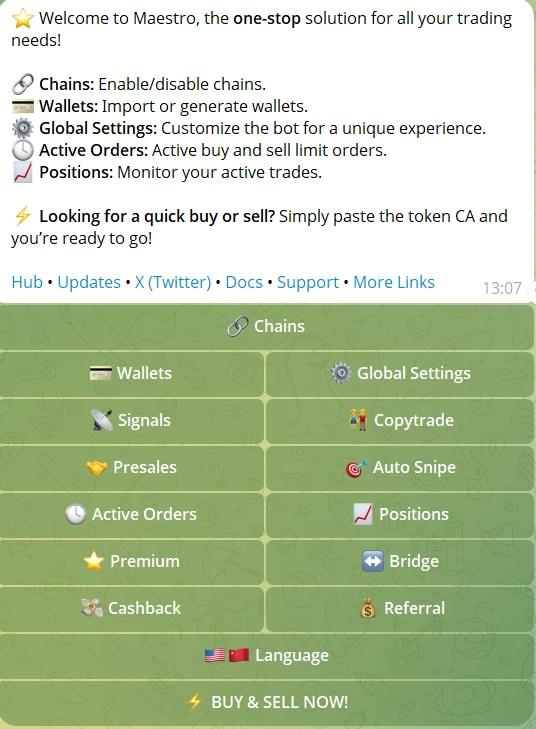
- Auto-Sniping (Block-0): watches the ETH and BSC mempool for launches and buys in the first block, with Dynamic Max Buy Adjustment.
- God Mode: buys the moment liquidity appears, Maestro's fastest entry on ETH and BSC.
- Turbo Mode: pushes execution speed higher on every supported chain.
- Limit Orders 2.0: several take-profit and stop-loss levels per position, ladder sells, staged exits and Entry Price % targets, editable without cancelling.
- Positions Ledger: one panel for every open position across wallets and chains, kept even if you delete a monitor.
- Copy Trading: up to 3 wallets free or 12 per chain on Premium; frontrun or match on ETH/BSC, copy-after on Base, Arbitrum and Solana, plus Track Only.
- DCA: pick an interval, a duration and a total amount instead of one lump buy.
- Signals: auto-buys tokens called in a connected Telegram alpha channel, with a Track Only option.
- Hits: counts how many alpha channels called a token, so you see crowding before you buy.
- Permanent referrals: a trader you refer stays linked to your account for good.
- Whale Bot: instant alerts on up to 3 tracked whale wallets.
- Bridge: private cross-chain swaps through Houdini Swap (Semi-Private or Private, up to $50,000 per order), or
/relayfor quick bridging into chains like Robinhood Chain. - Multi-wallet: 10 standard, 5 copy-trade and 5 auto-snipe wallets per chain;
/disperseand/collectmove funds between them. - Maestro Scraper: a separate bot that watches Telegram groups for contract addresses and snipes them.
- Smart Slippage: adjusts for token taxes and price impact, so fewer snipes fail.
- Presale sniping: PinkSale presale contributions from inside the bot.
- LaunchTax and Deadblock simulation: Premium tools that simulate a trade before you commit capital.
- Trending List: surfaces tokens with rising activity. Attention isn't quality, though.
Maestro's 15 supported chains and DEXes
Maestro connects each of its 15 chains to that network's busiest DEXes and launchpads. Newer chains such as Arc, Stable, Robinhood Chain and Ink usually have their DEX connections live by the time real volume shows up.
| Chain | DEXes and launchpads |
|---|---|
| Solana | Raydium, Orca, Jupiter, Pump.fun, Meteora, Boop |
| BNB Chain (BSC) | PancakeSwap V2/V3, FourMeme, OpenFour |
| Base | Aerodrome, Zora, Clanker, cbMEGA |
| Ethereum | Uniswap V2/V3/V4, SushiSwap, Zora, Clanker, Livo Launchpad v2 |
| Monad | gmonad.meme, Uniswap |
| Sonic | SpookySwap |
| Avalanche | Trader Joe |
| Arbitrum | Camelot, SushiSwap |
| HyperEVM (Hyperliquid) | Native Perp DEX, Motion |
| Robinhood Chain | Uniswap V2/V3/V4, Noxa.fi, DYOR Swap, bankr.bot, Flap, Flap.sh, ArenaTrade.ai, Livo.trade, printr.money, Pons, pew.fun, SushiSwap V2/V3, circus.trade, Flaunch, Pools.trade |
| Arc | Uniswap V2/V3/V4, DYOR Swap, DYOR Pump, DYOR V3, Virtuals tokens (up to 30% cashback) |
| Stable | DYORswap, Trench.today |
| Ink | Uniswap V3, SushiSwap |
| TRON | SunSwap |
| TON | DeDust, STON.fi |
If one network is your main ground, the chain pages go deeper: Maestro on Ethereum, BNB Chain, Base, TON, TRON and Circle's Arc chain.
Maestro speed benchmarks
Community benchmarks put Maestro at about 0.25 seconds on EVM chains and 0.15 seconds on Solana. Active traders reported these numbers from real launches, not a lab, so treat them as typical rather than promised.
| Network type | Reported execution time |
|---|---|
| EVM chains (Ethereum, BSC and others) | about 0.25 s |
| Solana | about 0.15 s |
A sub-quarter-second entry is what makes Block-0 sniping on Ethereum and BSC workable, since that's where most liquidity events happen. On Solana, 0.15 seconds fits well inside one slot of about 0.4 seconds.
God Mode and Turbo Mode matter most on high-contention drops, where everyone fights for the same block. Gas, priority fees and competing bots still decide the fill, so fast isn't the same as first.
Maestro fees: 1%, cashback and when Premium pays off
Maestro charges a flat 1% on every successful buy or sell, with no subscription needed to start. Withdrawals are free; you only pay network gas. Light traders barely notice the fee, and heavy traders claw a good share back.
The /cashback command unlocks a volume-based rebate of up to 30% of fees, paid in the chain's native token. Pump.fun trades count too, which adds up quickly if you live on Solana.
- Payout thresholds: cashback accrues until it clears the chain's minimum, 0.01 ETH, BNB or AVAX, or 0.5 TON.
- Solana: pays out in the same transaction, no threshold to wait for.
- TON: claim now through
/cashback.
Premium costs $200 a month. It adds the fastest execution tier, 30 monitors, LaunchTax and Deadblock simulation, priority support, 12 copy-trade wallets per chain instead of 3 and up to 120 limit orders. The free tier already covers all 15 chains, so Premium only earns its price at high volume.
Want to see what 1% means on your own trade size? Run it through our fee and slippage calculator.
Is Maestro safe? Anti-Rug, anti-MEV and key storage
Maestro's protection is designed to sell you out of a rug before it lands, but it's a capability, not a guarantee. The patented Anti-Rug system scans the mempool for malicious transactions (tax hikes, blacklists, mint events, liquidity pulls, dev sells) and tries to sell your position in the same block, before they execute.
- Anti-MEV routing: sends trades through private nodes, so sandwich bots can't wrap themselves around your order.
- Key storage: Maestro is non-custodial and stores private keys with AES encryption.
- Your side: turn on two-factor login for Telegram as a baseline.
DeFi risk never hits zero with any tool. Still, Maestro stacks three layers on every trade: patented Anti-Rug, anti-MEV routing and encrypted keys. Our guide on whether sniper bots are safe covers the checks no bot does for you.
Maestro strengths and weak spots
Maestro wins on breadth and protection, and loses on interface choice and Premium cost.
Strengths and limits
Strengths
- 15 chains in one Telegram interface
- Patented Anti-Rug and anti-MEV protection available on every trade
- Block-0 sniping, with God Mode for the fastest entries
- Up to 30% cashback on fees via
/cashback
Limits
- Telegram only: no web terminal or standalone dashboard
- $200 a month Premium is a stretch for casual traders
Weighing it against Trojan, the Solana-only specialist? Our Trojan review covers the other side of that choice.
Six Maestro strategies experienced traders use
Experienced traders stack modes, often running a different strategy on each wallet at the same time. Speed is only part of it.
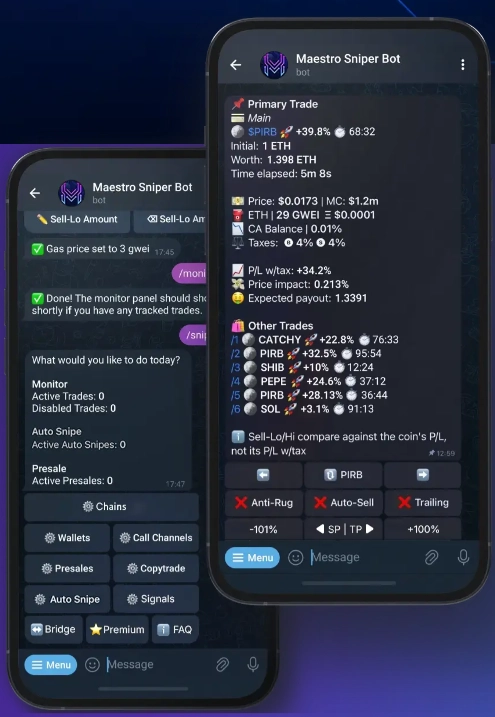
- Automated entries and exits. Pre-set dip buys with Limit Orders 2.0, ladder your take-profits and set stop-losses. Maestro keeps executing while you're offline, and staged exits stop one bad fill from wrecking the whole position.
- Copying a proven wallet. Find a wallet with an on-chain track record, tap Copy Trade, set your stake and let it mirror every move. Run Track Only first: watching costs nothing. Our copy trading comparison sets Maestro against Trojan here.
- Call-channel automation. Connect a Telegram alpha group and Maestro buys the moment a token gets called. Pair it with Maestro Scraper to catch contract addresses across several channels.
- Whale tracking. Point the Whale Bot at up to 3 wallets and get an alert the second they move size, often before the token hits a trending list.
- Cross-chain positioning. Spot a setup on a chain where you hold nothing? Bridge in with Houdini Swap or the faster
/relaywithout leaving the bot. Semi-Private and Private modes control how traceable the move is. - DCA into strong setups. For longer holds, accumulate on a schedule instead of aping in all at once. Set the interval, duration and total, then let it run without emotional entries.

How to make your first trade with Maestro
Getting from zero to a first snipe takes eight steps, and the bot's guided first run sets up a wallet in under a minute. Start with small amounts: the bot executes fast, and a misconfigured setting can cost you before you notice.
- Launch the bot. Open Telegram, start @MaestroSniperBot and clear the captcha to reach the main menu.
- Create or import a wallet. Tap Wallets, or use
/chainsfor a specific network. Generate a fresh wallet or paste an existing private key; it's stored with AES encryption. - Fund the wallet. Send the chain's gas token to the address shown: ETH for Ethereum, SOL for Solana, BNB for BSC. Or bridge in with
/relay. - Set your defaults. Choose buy and sell sizes, slippage and gas under Settings. On Ethereum gas drives speed; on Solana it's priority fees.
- Enable your chains. In Chain Settings, turn on only the networks you trade. With 15 available, the rest is just noise.
- Snipe or buy. Tap Snipe or paste a contract address, set the amount, read the token report, switch Anti-Rug and Anti-MEV on and confirm. The trade appears in the Positions Ledger.
- Add exits. From the open position, tap Limit Orders for several take-profit and stop-loss levels. Ladder Sells spread the exit across prices, editable any time.
- Claim cashback. Type
/cashbackto see your tier and withdraw what you've earned, paid in each chain's native token.
Maestro questions: free use, sniping safety and /cashback
These three come up before almost every first trade.
Is Maestro free to use?
Yes. There's no subscription to start: Maestro takes 1% of successful trades, and withdrawals are free apart from network gas. Premium at $200 a month adds speed, 30 monitors, simulation tools and more wallet slots; most traders never need it.
Is Maestro safe for token sniping?
It's non-custodial with AES-encrypted keys, and its Anti-Rug system is designed to detect malicious mempool transactions and sell before they execute. Anti-MEV routing blocks sandwich attacks. No tool removes DeFi risk, and checking the token before you buy stays your job.
What does the /cashback command do?
It claims a volume-based rebate of up to 30% of your Maestro fees, Pump.fun trades included. Cashback accumulates and pays out in the chain's native token once it clears that chain's withdrawal threshold.