How dollar-cost averaging works in crypto
DCA means buying a fixed amount at regular intervals, whatever the price, so your entry cost averages out over time. You set a buy at $0.0042, the token dips to $0.0031 the next morning, and a single entry suddenly looks terrible. DCA takes that timing bet off the table.
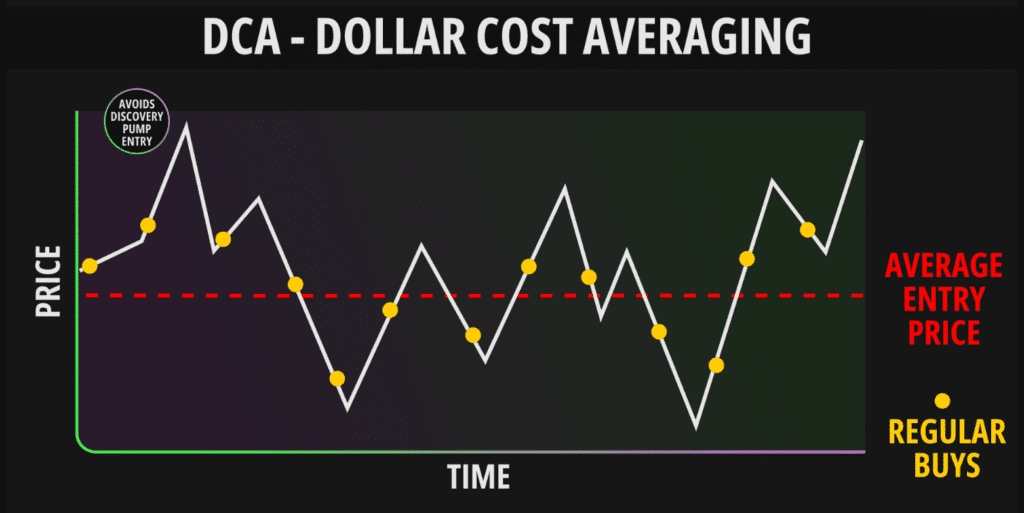
Say you have $1,000 for a new Solana memecoin. Instead of going all in, you make ten $100 buys, one a day. Some land high, some catch a dip, and after ten days your average cost sits in the middle without you ever guessing the right day.
The strategy isn't new (Investopedia's explainer covers the basics); the value of a bot is removing human hesitation from each buy.
Why a DCA bot beats buying by hand
Manual DCA breaks the moment something happens while you're offline. A liquidity event, a migration, a volume spike: the scheduled buy has to fire then, not ten minutes later when you see the notification. A bot fires on the interval, every time.
Pair DCA with a Solana sniper bot and you get two things at once: risk spread across entries, and automated execution with MEV protection on each buy. Once it's configured, there's no chart to watch.
The underrated benefit is FOMO resistance. When a coin rips and you want to oversize, the bot keeps the same cadence. That discipline is harder to hold by hand than most traders admit.
Trojan for DCA on Solana
Trojan is the sharper DCA tool on Solana: over $25 billion traded by more than 2 million users, as a Telegram bot and a full web terminal at trojan.com/terminal. You set amount per buy, interval and total duration; BOLT executes in under 2 seconds, even during migrations and launch windows when the chain is congested.
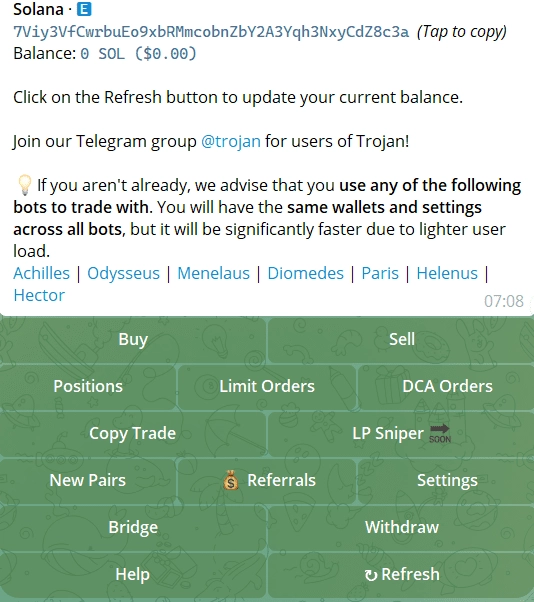
BOLT Pro needs a 50+ SOL wallet. Below that, standard execution is still fast, and for most DCA campaigns on mid-caps it's all you need.
- DCA orders: interval, duration and amount per buy, then it runs on its own.
- BOLT execution: sub-2-second fills, so scheduled buys land in volatile, crowded conditions.
- Limit orders with TP/SL: exits on any position, DCA-built ones included.
- MEV protection via Jito: private routing against sandwich attacks on every buy.
- Copy trading: mirror profitable wallets while your DCA runs.
- Migration Sniper: buys the moment a token leaves its bonding curve.
- Arena cashback: up to 45% of fees back in SOL.
Strengths and limits
Strengths
- Fast DCA execution on Solana with BOLT
- Full web terminal for managing campaigns
- Up to 45% fee cashback through the Arena
Limits
- Solana only
- BOLT Pro needs 50+ SOL
Back to the $1,000 example: Trojan buys $100 a day for 10 days. On day three the price drops 10%, and that day's buy picks up more tokens automatically. By day ten your average cost reflects the cheaper fills, with zero input after setup.
MevX for multi-chain DCA
Trojan does one chain; MevX runs DCA on six: Solana, Ethereum, BNB Chain, Base, Robinhood Chain and Monad, from a web app, a Telegram bot and a Chrome extension. The Singapore-based platform booked over $30 million in revenue in 2024.
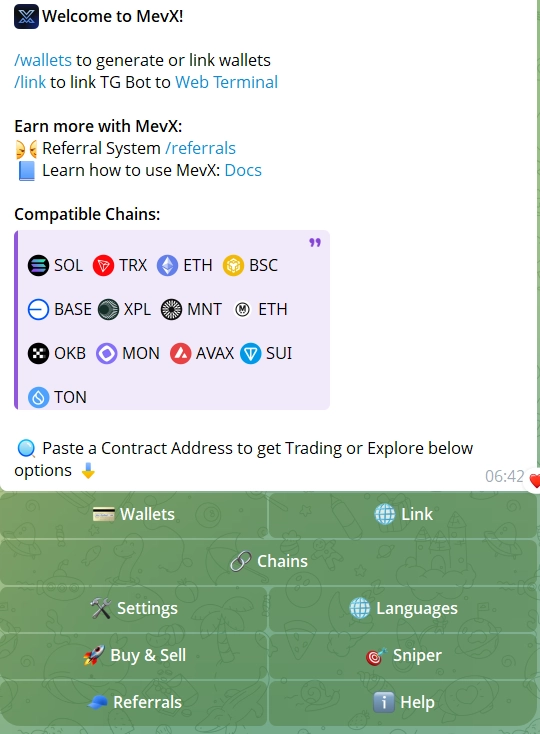
On long campaigns, the 0.5% fee on BSC adds up in your favor, because fees hit every interval buy. The feature that matters for exits is the market-cap limit order: set your DCA exit at a valuation rather than a price, which says far more on low-float tokens.
- DCA: interval and total amount on all six chains.
- Limit orders by market cap: exit triggers set on valuation, not just price.
- Bubble Maps: check holder clusters before you start a campaign.
- Meme Zone and Degen Zone: live trackers to spot DCA candidates.
- Trailing stops: protect DCA gains on the way out.
- Chrome extension: manage positions from any chart or feed.
Strengths and limits
Strengths
- DCA on six chains in one platform
- 0.5% on BSC, cheap over long campaigns
- Market-cap limit orders
Limits
- Three platforms can feel scattered next to one focused interface
How to set up a DCA order in Trojan
Seven steps, and the exit is set before the first buy.
- Check the token first. Run the contract through Rugcheck for unlocked liquidity, Whale concentration or a live mint function. DCA only makes sense on a token with real traction and a community behind it.
- Open Trojan. Start @solana_trojanbot; a Solana wallet is created on first use. Fund it with the full DCA budget plus fees for every scheduled buy.
- Paste the contract address. Take it from DexScreener or the project's official channel. Trojan shows price, liquidity and a safety check; confirm it's the right token.
- Configure DCA Orders. Amount per buy (say $100 in SOL), interval (every 24 hours) and duration (10 days). For most memecoins, 2% to 5% slippage works: tighter misses fills, wider overpays on volatile prints.
- Set the exit. With limit orders, put a take-profit at 2x your average entry and a stop-loss 25% below, so both sides run without you.
- Check in every few days. Trojan's token analytics show top holders and wallet activity. If a Whale starts unloading or the community goes quiet, pause or cancel the remaining orders.
- Close the campaign deliberately. When the planned duration ends, judge the position fresh rather than extending on momentum.
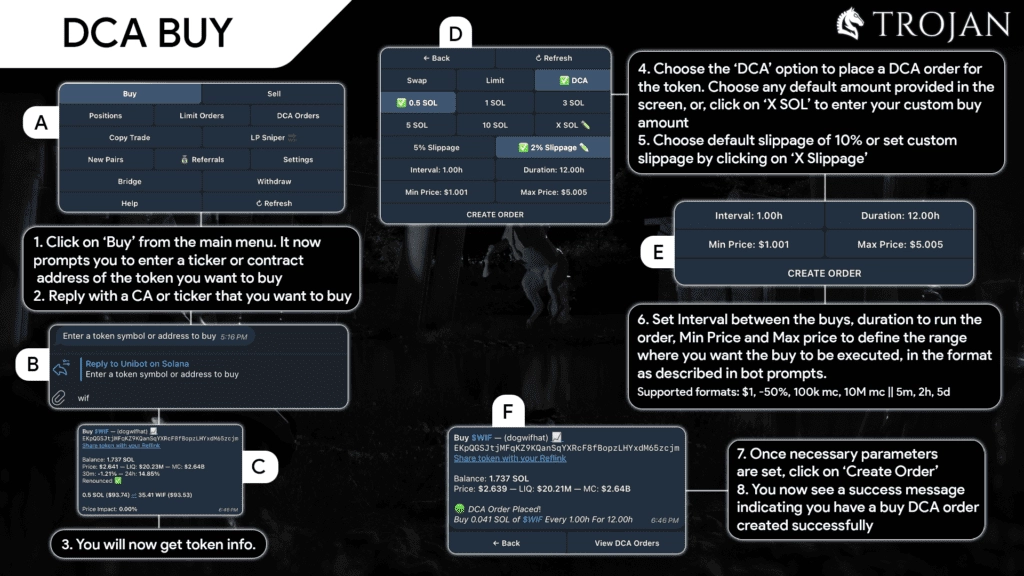
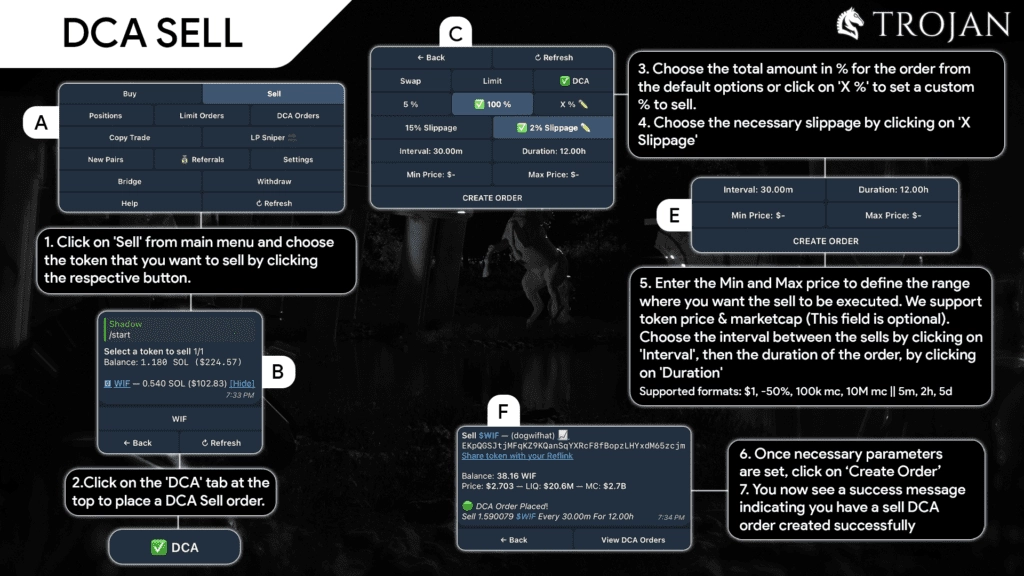
The Trojan documentation lists every DCA field.
Which tokens suit DCA, and which to skip
DCA protects you from bad timing on a real token, not from a scam. It pays off on tokens with growing communities, active development and steady on-chain volume: real Telegram activity, regular updates, rising holder counts.
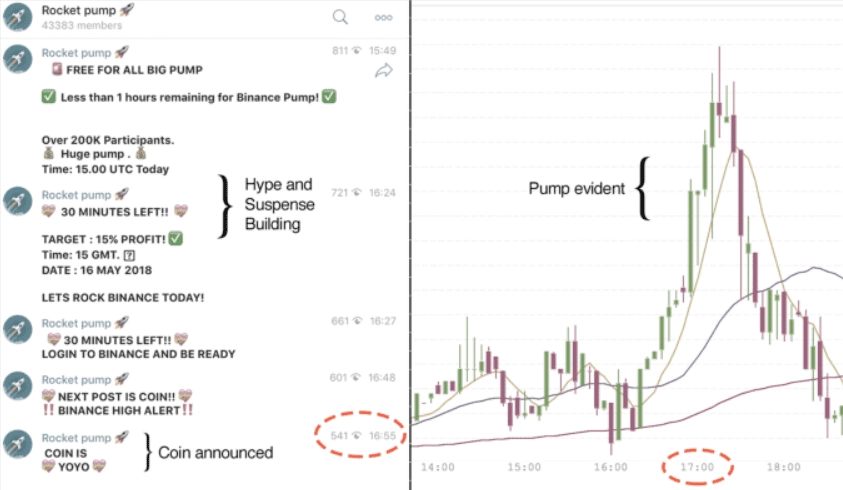
Skip anything that doubled overnight on X noise with no roadmap and unlocked liquidity. Those tokens don't grow; they dump once early buyers exit. Averaging into a rug just means losing money in smaller, evenly spaced steps. If Rugcheck shows several red flags, walk away, however good the chart looked ten minutes ago.
Habits that make a DCA bot work
The setup is easy; the discipline is the hard part.
- 💡 Size it right: never DCA more into one token than you can lose entirely. Spread across positions.
- 📊 Watch liquidity mid-campaign: on DexScreener, a token losing liquidity while you're still buying is a signal to reassess.
- ⏱️ Match the interval to volatility: daily or every few hours for volatile memecoins, weekly for steadier mid-caps.
- 🛡️ Scan before every setup: catching a honeypot or live mint before you start saves the whole budget.
- 🎯 Run copy trading alongside: watching smart money on the same token tells you early if the thesis is changing.
- 🔄 Don't FOMO-extend: extending because price is up is a new decision and deserves the same analysis as the first.
Before you start, check what fees do to a ten-buy campaign with our fee and slippage calculator.