

Why trade Robinhood Chain with a Telegram bot
Robinhood Chain is an Ethereum layer 2 built on Arbitrum's stack, with blocks every 100 ms or so and Ethereum security underneath. Testnet opened in February 2026 and mainnet went live on 1 July 2026, alongside tokenized Stock Tokens trading around the clock through Robinhood Wallet in more than 120 countries, with Uniswap among the day-one DeFi partners.

First, what it is not: the chain is not the Robinhood brokerage app, and no Telegram bot is run by Robinhood. A bot is simply a quicker way to trade its DEXes and launchpads.
New tokens launch on Noxa.fi and a growing list of launchpads, prices move within seconds of liquidity landing, and on 100 ms blocks a manual wallet signature is too slow. That's where a bot like Maestro earns its fee: it already counts Robinhood Chain among its 15 chains, so you trade it from the same chat as Ethereum, Base or Solana.
Robinhood Chain DEXes and launchpads Maestro trades
Maestro connects to more than a dozen Robinhood Chain venues, from Uniswap's three versions to the chain's native launchpads.
| Type | Venues on Robinhood Chain |
|---|---|
| DEXes | Uniswap V2, V3 and V4, SushiSwap V2 and V3, DYOR Swap, Pools.trade |
| Launchpads and launch platforms | Noxa.fi, bankr.bot, Flap and Flap.sh, ArenaTrade.ai, Livo.trade, printr.money, Pons, pew.fun, circus.trade, Flaunch |
Uniswap carries the deepest pools; if you've traded Uniswap on Ethereum or Arbitrum, the mechanics carry straight over.
Noxa.fi plays the role Pump.fun plays on Solana: a native launchpad where tokens start before migrating to deeper liquidity. The rest of the list is where early launches happen, and having them all in one bot means you don't switch platforms to catch a launch on a different pad.
Maestro features for Robinhood Chain traders
On Robinhood Chain you get Maestro's core toolkit; check which features are chain-specific before you plan around them.
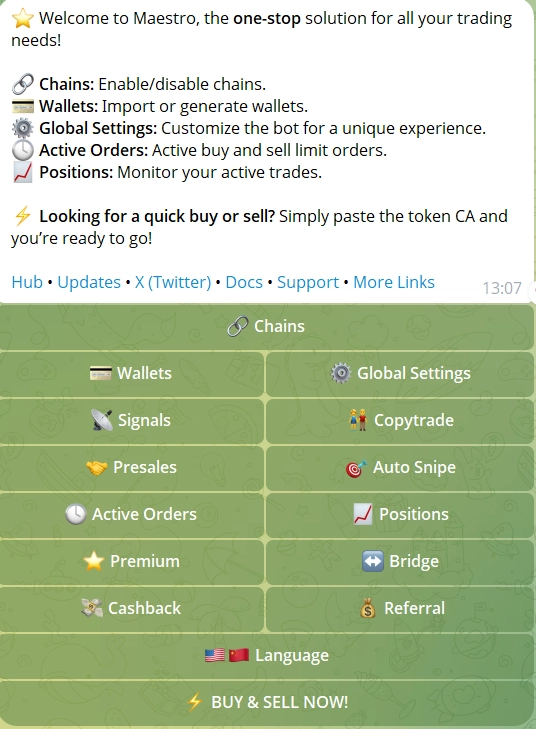
- Turbo Mode: faster execution on every supported chain, Robinhood Chain included.
- Limit Orders 2.0: several take-profit and stop-loss levels per position, ladder sells and staged exits, editable without cancelling.
- Positions Ledger: every open position across wallets and chains in one panel.
- DCA: interval, duration and total amount instead of one lump buy.
- Signals and Whale Bot: auto-buys from connected call channels, and alerts on up to three tracked Whale wallets.
-
/relaybridging: Maestro's quick route into Robinhood Chain, plus Houdini Swap for private cross-chain swaps up to $50,000. - Multi-wallet: up to 10 standard wallets per chain, with
/disperseand/collectto move funds between them.
Two limits to know. Block-0 Auto-Sniping and God Mode are documented for ETH and BSC, not Robinhood Chain. And Maestro's copy trading runs on ETH, BSC, Base, Arbitrum and Solana, not on Robinhood Chain for now. If copying wallets on this chain matters to you, see the other bots below.
Maestro fees and safety on Robinhood Chain
Maestro charges a flat 1% on every successful buy or sell, with no subscription; /cashback returns up to 30% of fees by volume. Withdrawals are free apart from network gas, and on an Arbitrum-based L2 gas is a small line.

Premium at $200 a month adds the fastest execution tier, 30 monitors, simulation tools and more copy-trade wallets; the free tier already covers Robinhood Chain. On safety, Maestro is non-custodial and stores keys with AES encryption, and its patented Anti-Rug system watches the mempool and is designed to sell before a rug, blacklist or mint executes. It can be outbid, and no protection catches every rug.
The risk specific to this chain is branding. Anything called a "Robinhood bot" trades on a famous name, and clones follow every new chain. Only open Maestro from an official link, never type a secret phrase into a chat, and remember that Robinhood itself doesn't run a Telegram trading bot. Our guide on whether sniper bots are safe covers the checks that apply everywhere.
How to set up Maestro on Robinhood Chain
Six steps, about five minutes, before your first Robinhood Chain trade.
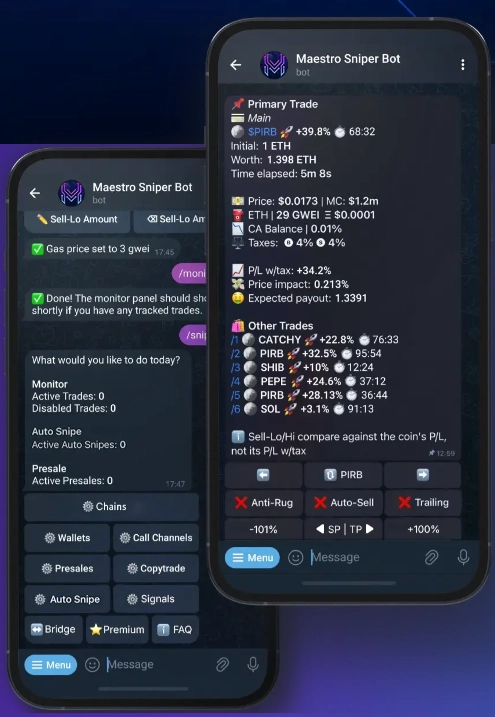
- Open Maestro. Start @MaestroSniperBot in Telegram and clear the captcha.
- Create a dedicated wallet. Generate a fresh EVM wallet under Wallets rather than importing your main one; the key is AES-encrypted.
- Bridge in. Use
/relayto move ETH onto Robinhood Chain from another chain, or send it to the wallet address directly. Keep a little extra for gas. - Turn on the chain. In Chain Settings, enable Robinhood Chain and switch off networks you don't trade.
- Set defaults. Buy and sell sizes, slippage and gas. Start with wider slippage on Noxa.fi launches than you'd use on a deep Uniswap pool.
- Trade and set exits. Paste a contract, read the token report, switch Anti-Rug on and confirm; then add take-profit and stop-loss levels with Limit Orders 2.0 so the exit is in place before the token moves.
How to trade a young chain like Robinhood Chain
Mainnet is months old, so liquidity outside the largest day-one venues is still thin and price discovery is choppy. If you're used to deep Solana or Ethereum pools, this will feel shallower.
- Size small. Smaller positions until pools deepen; a thin pool can't absorb a large exit without a big slippage hit.
- Dial in slippage and gas first. On thin pools, slippage runs higher by default; a few minutes of setup before trading makes a real difference to fills, especially on Noxa.fi, DYOR and bankr.bot launches where prices jump right after launch.
- Exit in stages. Ladder take-profits with Limit Orders 2.0 rather than hoping to sell everything at the top.
- Watch early movers. New chains reward tracking the wallets that buy first; Maestro's Whale Bot alerts you when tracked wallets move.
Check the chain itself on Robinhood's official chain page and run any token you don't know through a rug check before buying.
Other bots that trade Robinhood Chain
Maestro isn't the only option; several bots we cover support Robinhood Chain, each with a different strength.
| Bot | What it offers on Robinhood Chain |
|---|---|
| MevX | Uniswap, Noxa.fun, vlad.fun and Uniswap's TradePools launchpad, from Telegram, web or Chrome, about 1% per trade |
| Banana Gun | Trading, DCA, copy trading and limit orders since day one on the chain |
| Bloom | Uniswap, Virtuals, Noxa, USDG pools, Bankr, Flap, Fomo and Bags.fm in the Bloom EVM bot |
| Sigma | Robinhood Chain among its EVM chains, 1% fee, no gas on failed transactions |
| Prodigy | Uniswap V2/V3, with per-chain gas and slippage settings |
If copy trading on Robinhood Chain is the priority, Banana Gun is the one that lists it there. For the wider picture across chains, see our roundup of the best Telegram sniper bots.