
Maestro Bot is one of the most popular Telegram trading bots for on-chain crypto trading, combining a fast sniper bot, copy trading, DCA automation, limit orders, and industry-leading Anti-Rug protection across 15 blockchains (including Solana, ETH, BSC, Stable, Arc, Robinhood, INK, Base, Hype and more). In this Maestro Bot review, we’ll examine its features, trading fees, speed, supported networks, and whether it’s still one of the best Telegram bots for memecoin trading, token launches, and DeFi investors in 2026.
Key Takeaways
- Flat 1% fee, no subscription needed to start trading.
- 15 blockchains covered, including Ethereum, Solana, BSC, Stable, Arc, Robinhood and INK.
- Patented Anti-Rug and Anti-MEV protection run on every single trade.
- Up to 30% fee cashback through the /cashback command.
Maestro Sniper Bot: What It Is and Why the 15-Chain Scope Matters
Maestro launched in 2022 as the first Telegram bot with patented Anti-Rug technology, and it’s grown into a 573,000-user, $12.8B+ lifetime volume operation since. The Maestro 2.0 update added Limit Orders 2.0 with laddering and staged exits, one consolidated Positions Ledger, quicker execution, and a steady run of new DEX integrations, Uniswap V4, Raydium LaunchLab, and Boop among them.
What separates it from single-chain bots is running 15 networks from one interface. You can hold positions on Ethereum and Solana at the same time, or hunt fresh launches on Base and Monad, all from one private Telegram chat. No browser terminal, no switching apps mid-trade. That breadth, backed by real security tooling, is why traders searching for the best Solana sniper bot tend to land on Maestro anyway: it covers Solana and everything else too.
What Maestro 2.0 Actually Changed
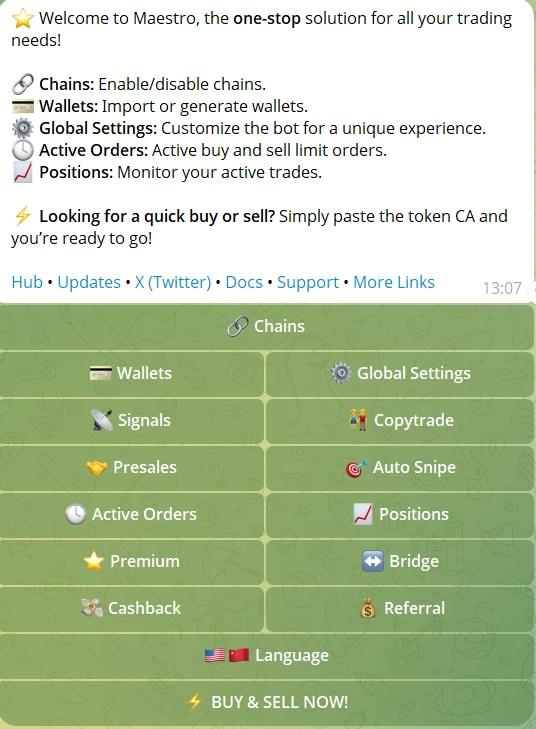
The 2.0 update isn’t a coat of paint. Execution speed, the order system, wallet management, and DEX coverage all got real work done. Here’s what actually matters if you’re trading with it right now.
- 🎯 Auto Sniper (Block-0): Fully automated Block-0 sniping on ETH/BSC. Watches the mempool for launches and fires with Dynamic Max Buy Adjustment.
- ⚡ God Mode: Buys the second liquidity appears, the fastest entry Maestro offers on ETH/BSC.
- 🚀 Turbo Mode: Pushes execution speed higher across every supported chain.
- 🎯 Limit Orders 2.0: Multiple TP/SL levels per position, ladder sells, staged exits, Entry Price % targets, all editable without cancelling the order.
- 📊 Positions Ledger: One panel for every open position, across every wallet and every chain. Survives even if you delete a monitor.
- 👥 Copy Trading: Copy up to 3 wallets free (10 on Premium), frontrun or match on ETH/BSC, copy-after on Base/Arbitrum/Solana, plus a Track Only option.
- 📈 DCA: Set an interval, duration, and total amount for systematic entries instead of one lump buy.
- 🔄 Signals: Auto-buys tokens the moment they’re called in any connected Telegram alpha channel, with Track Only mode available.
- 🐋 Whale Bot: Instant alerts on up to 3 tracked whale wallets.
- 🌉 Bridge (Houdini Swap & /relay): Private cross-chain swaps via Houdini Swap, Semi-Private or Private mode, up to $50,000 per order. Use /relay for quick bridging straight into newer chains like Robinhood Chain.
- 💼 Multi-Wallet Management: 10 standard wallets plus 5 for copytrade and 5 for autosnipe per chain.
/disperseand/collectmove funds between wallets without manual transfers. - 🔍 Maestro Scraper: A standalone bot that watches any Telegram group for contract addresses and snipes them automatically.
- ⚙️ Smart Slippage: Adjusts automatically for token taxes and price impact, which cuts down on failed snipes.
- 🏷️ Presale Sniping: PinkSale presale contributions straight from the bot.
- 💰 Cashback Program: Up to 30% back on fees, claimed with /cashback, Pump.fun trades included.
- 🔬 LaunchTax & Deadblock Simulation: Premium tools that simulate a trade before you put capital behind it.
- 🔥 Trending List: Surfaces tokens with rising activity before the crowd notices.
Premium runs $200/month and gets you fastest execution, 10 wallets plus 5 copy-trade plus 5 snipe wallets, 30 monitors, simulation tools, and priority support. Most traders never touch it: the free tier at 1% fee already covers all 15 chains.
Want to see it in action? Launch Maestro Sniper Bot on Telegram.
Supported Chains and DEXs
Maestro runs on 15 verified blockchains, each wired into its busiest DEXs and launchpads. From established networks like Ethereum and Solana to newer additions like Arc, Stable, Robinhood Chain, and INK, the DEX connections are usually already live by the time a chain gets real trading volume.
Uniswap V2/V3/V4 · SushiSwap · Zora · Clanker · Livo Launchpad v2
PancakeSwap V2/V3 · FourMeme · OpenFour
Raydium · Orca · Jupiter · Pump.fun · Meteora · Boop
DYORswap · Trench.today
Aerodrome · Zora · Clanker · cbMEGA
Camelot · SushiSwap
Trader Joe
DeDust · STON.fi
Native Perp DEX – Motion
gmonad.meme · Uniswap
SpookySwap
SunSwap
Uniswap V2/V3/V4 · Noxa.fi · DYOR Swap · bankr.bot · Flap · Flap.sh · ArenaTrade.ai · Livo.trade · printr.money · Pons · pew.fun · SushiSwap V2/V3 · circus.trade · Flaunch · Pools.trade
Uniswap V2/V3/V4 · DYOR Swap · DYOR Pump · DYOR V3
Uniswap V3 · SushiSwap
Execution Speed: What the Benchmarks Actually Show
Community benchmarks from active traders put Maestro at roughly 0.25 seconds on EVM chains and 0.15 seconds on Solana. Those numbers come from real launches, not lab conditions. That sub-quarter-second EVM entry is what makes Block-0 sniping on Ethereum and BSC work, since that’s where most liquidity events happen. On Solana, 0.15 seconds puts Maestro right alongside the fastest native bots out there. God Mode and Turbo Mode exist for the launches where you need to squeeze out every extra millisecond, and the difference shows most on high-contention drops where everyone’s fighting for the same block.
Pros and Cons
Pros & Cons
- 15-chain coverage in one Telegram interface
- Patented Anti-Rug and Anti-MEV protection on every trade
- Block-0 sniping with God Mode for the fastest entries
- Up to 30% cashback on fees via /cashback
- Telegram-only, no web terminal or standalone dashboard
- $200/month Premium is a stretch for casual traders
Six Ways Experienced Traders Use Maestro
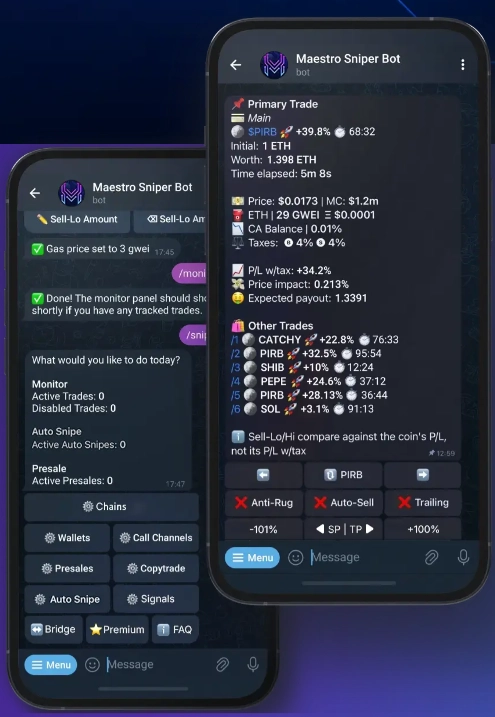
Speed is only part of the picture. The traders getting the most out of Maestro usually stack a few modes together, often running different strategies on different wallets at once.
- 📊 Automated Entries and Exits: Pre-set buys on dips with Limit Orders 2.0, ladder your take-profits, set stop-losses. Maestro keeps executing while you’re offline, and staged exits mean one bad fill doesn’t wipe out the position.
- 👥 Copy a Proven Wallet: Find a wallet with a track record on-chain, tap Copy Trade, set your stake size, let it mirror every move. Track Only mode lets you watch a wallet first without risking capital, worth doing before copying anyone new.
- 🔔 Signals and Call-Channel Automation: Connect a Telegram alpha group and Maestro auto-buys the moment a token gets called. Pair it with Maestro Scraper to catch contract addresses posted across several channels at once.
- 🐋 Whale Tracking: Set the Whale Bot on up to 3 wallets and get alerted the second they move size. This is how you get ahead of momentum before a token shows up on trending lists.
- 🌉 Cross-Chain Positioning: Strong setup on a chain where you’re not holding anything? Use Houdini Swap’s bridge inside Maestro, or the faster /relay command, to move funds without leaving the bot. Semi-Private and Private modes give you control over traceability.
- 📈 DCA into Strong Setups: For longer holds, accumulate over time with DCA instead of buying all at once. Set the interval, duration, and total amount, and let it run without emotional entries.

Security: Patented Anti-Rug, Anti-MEV Routing, Encrypted Keys
Maestro is non-custodial: private keys sit under AES-level encryption and never leave Telegram’s local storage. The patented Anti-Rug system catches malicious transactions in the mempool, tax hikes, blacklists, mint events, dev sells, then frontruns them to get you out before the damage lands. Anti-MEV protection routes trades through private nodes, so sandwich bots can’t insert themselves around your order.
Turn on two-factor Telegram login as a baseline, no tool removes DeFi risk entirely. But between patented Anti-Rug, Anti-MEV routing, and encrypted key storage, Maestro’s setup is about as hardened as Telegram trading gets. The Solana blockchain, Maestro’s fastest supported chain, adds its own finality speed on top of that.
Fees, Cashback, and When Premium Makes Sense
Maestro charges a flat 1% fee on every successful buy or sell. No subscription needed to start, and withdrawals are free: you only cover network gas. Cost scales with activity, so light traders barely feel it and heavy traders claw most of it back through cashback.
The /cashback command unlocks a volume-based rebate of up to 30% on fees, paid in the native chain token. The same rebate applies to Pump.fun trades too, which adds up fast if Solana is where you spend most of your time. Cashback builds up until it clears the withdrawal threshold for that chain (0.01 ETH/BNB/AVAX, 0.5 TON depending on the network; on Solana it pays out in the same transaction). TON traders can claim now via /cashback.
Premium at $200/month makes sense once your volume justifies faster execution and extra wallet slots. 10 wallets plus 5 copy-trade plus 5 snipe wallets, 30 monitors, simulation tools, priority support. For everyone else, the free tier at 1% covers all 15 chains with no restrictions on core features.
How to Use Maestro Sniper Bot
Launch the Bot on Telegram
Open Telegram and start Maestro Sniper Bot here. Clear the captcha and you’re on the main menu.
Create or Import a Wallet
Tap Wallets, or open the /chains menu to create or import a wallet for a specific network. Generate a fresh one inside the bot, or paste in an existing private key. AES encryption kicks in the moment it’s stored.
Fund Your Wallet
Send the native gas token for your chain to the address the bot shows you: ETH for Ethereum, SOL for Solana, BNB for BSC. Or use /relay to bridge funds in from a chain you already hold. Start small until the interface feels familiar.
Configure Your Preferences
Set default buy/sell sizes, slippage, and gas under Settings. On Ethereum, gas drives speed. On Solana, it’s priority fees. These apply to every trade unless you override one manually.
Enable Your Chains
Tap Chain Settings and turn on only the networks you actually trade. With 15 chains available, leaving the rest off keeps the interface quiet.
Snipe or Buy a Token
Tap Snipe or paste a contract address. Set your amount, check the token report, toggle Anti-Rug and Anti-MEV on, confirm. The position lands in the Positions Ledger right away.
Set Limit Orders and Stop-Losses
From any open position, tap Limit Orders for multiple TP/SL levels. Ladder Sells spread your exit across price points automatically, and you can edit anytime without cancelling the position.
Claim Cashback via /cashback
Type /cashback to check your rebate tier and pull accumulated cashback. Pump.fun trades included. Paid out in the native token of each chain you traded on.
Frequently Asked Questions
Yes, no subscription required to start. Maestro charges a flat 1% fee only on successful trades, and withdrawals are free: you just pay network gas. A $200/month Premium plan unlocks fastest execution, 30 monitors, simulation tools, and expanded wallet slots. Most traders never need it.
15 verified blockchains: Ethereum, BNB Smart Chain, Solana, Base, Arbitrum, Avalanche, TON, Hyperliquid, Monad, Sonic, Stable, TRON, Arc, Robinhood Chain, and INK. Each chain connects to its primary DEXs for live sniping and trading.
Maestro is non-custodial with AES-encrypted key storage. Patented Anti-Rug protection detects malicious mempool transactions and frontruns them before they execute. Anti-MEV routing blocks sandwich attacks by sending trades through private nodes. DeFi risk never hits zero regardless of the tool, but Maestro’s security setup is among the most comprehensive available in Telegram trading.
/cashback claims a volume-based rebate of up to 30% on Maestro’s trading fees. Pump.fun trades qualify too. Cashback accumulates and pays out in the native chain token once your balance clears the withdrawal threshold for that chain.
Yes. Maestro replaces code with large labeled buttons and sliders. The guided first-run wizard sets up a wallet in under a minute. Anti-Rug and Stop-Loss toggles handle risk management automatically. That said, start with small amounts while learning the interface: the bot executes fast, and a misconfigured setting can cost you before you notice.
Yes, across multiple chains. Free accounts copy up to 3 wallets; Premium accounts get up to 10. On ETH and BSC you can choose frontrun or match mode. On Base, Arbitrum, and Solana it runs copy-after. Track Only mode lets you observe a wallet’s behavior without committing funds, which is worth using before copying any new address.
Yes. Robinhood Chain is fully supported, including meme coin trading through DEXs like Flap, Flap.sh, ArenaTrade.ai, Uniswap V2/V3/V4, Noxa.fi, DYOR Swap, bankr.bot, Livo.trade, printr.money, Pons, pew.fun, SushiSwap V2/V3, circus.trade, and Flaunch. Create or import a wallet from the /chains menu, then use /relay to bridge funds in from another network.
Yes, both are fully supported. On Stable, Maestro connects to DYORswap and Trench.today, and you can trade Stable-native tokens directly through the bot. On Arc, Maestro routes through Uniswap V2/V3/V4, DYOR Swap, DYOR Pump, and DYOR V3, with the same Anti-Rug and Anti-MEV protection as every other chain.
Resources